Components and Pipeline
The axisfuzzy.analysis module provides a comprehensive framework for building modular, reusable data analysis workflows. At its core lies the component-pipeline architecture, which separates individual analysis operations (components) from their orchestration (pipelines).
This design promotes code reusability, testability, and maintainability while enabling complex analytical workflows through simple composition patterns.
This document explores the foundational concepts, built-in components, and pipeline architecture that power the fuzzy data analysis system in axisfuzzy.
AnalysisComponent Foundation
Architecture Overview
The AnalysisComponent serves as the foundational base class
for all analysis tools in the axisfuzzy.analysis ecosystem. This design follows the marker pattern,
providing a clear type hierarchy and common interface while maintaining flexibility for diverse
component implementations.
The architecture embraces object-oriented principles over functional programming approaches, promoting better state management, configuration serialization, and framework-level integration.
Each component encapsulates both its operational logic and configuration state, enabling sophisticated pipeline construction and execution tracking.
from axisfuzzy.analysis import AnalysisComponent
from axisfuzzy.analysis import contract

class CustomAnalyzer(AnalysisComponent):
    def __init__(self, threshold: float = 0.5):
        self.threshold = threshold

    @contract
    def run(self, data):
        # Component-specific logic
        return processed_data

    def get_config(self) -> dict:
        return {'threshold': self.threshold}
Core Methods
The base class defines two fundamental methods that establish the component contract:
The run() Method Contract
The run() method serves as the primary execution entry point for all components. While the base
implementation raises NotImplementedError, subclasses must override this method to provide their
specific functionality.
The method signature is intentionally flexible, accepting arbitrary positional and keyword arguments to accommodate diverse analysis requirements.
def run(self, *args, **kwargs):
    """
    Execute the component's analysis logic.

    This method should be overridden by all subclasses to implement
    their specific functionality.
    """
    raise NotImplementedError(
        f"{self.__class__.__name__} must implement the 'run' method."
    )
Configuration Serialization with get_config()
The get_config() method is an abstract method that must be implemented by all subclasses. It returns
a JSON-serializable dictionary containing the component’s configuration parameters.
This enables pipeline serialization, reproducibility, and debugging capabilities.
@abstractmethod
def get_config(self) -> dict:
    """
    Returns the configuration of the component.

    Returns
    -------
    dict
        A JSON-serializable dictionary of configuration parameters.
    """
Design Philosophy
The component architecture embodies several key design principles:
Object-Oriented Approach vs. Functional Programming
Unlike purely functional approaches, the component system emphasizes stateful objects that encapsulate both behavior and configuration.
This design choice enables:
State Management: Components can maintain internal state and configuration
Serialization: Complete pipeline configurations can be saved and restored
Type Safety: Clear inheritance hierarchies support static analysis and IDE assistance
Framework Integration: Components integrate seamlessly with the pipeline execution engine
Composition Over Inheritance
While components inherit from AnalysisComponent, the system favors composition patterns for
building complex workflows.
Individual components remain focused and single-purpose, with complexity emerging from their orchestration rather than deep inheritance hierarchies.
Type Safety
The component system integrates deeply with the contract system to provide type safety and runtime validation.
Components use type annotations in their run() methods to declare input and output contracts,
enabling automatic validation and clear documentation of data flow requirements.
from axisfuzzy.analysis.contracts import contract
from axisfuzzy.analysis.build_in import ContractCrispTable

class TypeSafeComponent(AnalysisComponent):
    @contract
    def run(self, data: ContractCrispTable) -> ContractCrispTable:
        # Type-safe implementation with automatic validation
        return processed_data
The @contract decorator automatically validates inputs and outputs against their declared types,
providing runtime safety and clear error messages when type mismatches occur.
Inheritance Patterns
Best practices for extending the AnalysisComponent base class include:
1. Constructor Patterns
Always call the parent constructor and store configuration parameters as instance attributes:
def __init__(self, param1: str, param2: int = 10):
    super().__init__()  # Optional but recommended
    self.param1 = param1
    self.param2 = param2
2. Configuration Management
Implement get_config() to return all constructor parameters:
def get_config(self) -> dict:
    return {
        'param1': self.param1,
        'param2': self.param2
    }
3. Contract Integration
Use type annotations and the @contract decorator for type safety:
@contract
def run(self, input_data: InputContract) -> OutputContract:
    # Implementation with automatic type validation
    pass
This foundation enables the construction of robust, type-safe analysis pipelines while maintaining the flexibility needed for diverse analytical workflows.
Built-in Component Library
The axisfuzzy.analysis.component.basic module provides a comprehensive suite of pre-built components
that address common data preprocessing, transformation, and aggregation requirements in fuzzy analysis
workflows.
Component Categories
The built-in library organizes components into three primary categories:
Data Preprocessing Components: Handle normalization, scaling, and data preparation tasks essential for consistent fuzzy analysis.
Transformation Components: Perform data type conversions, statistical computations, and structural modifications.
Aggregation Components: Combine multiple data sources or reduce dimensionality through mathematical operations.
Key Components
ToolNormalization
The ToolNormalization component provides multiple normalization strategies for crisp data tables,
ensuring data consistency across different scales and ranges.
from axisfuzzy.analysis.component.basic import ToolNormalization

# Min-max normalization (default)
normalizer = ToolNormalization(method='min_max', axis=1)

# Z-score standardization
z_normalizer = ToolNormalization(method='z_score', axis=0)

# Sum normalization
sum_normalizer = ToolNormalization(method='sum', axis=1)
Supported Methods: min_max, z_score, sum, max
Axis Control: Row-wise (axis=1) or column-wise (axis=0) operations
ToolWeightNormalization
Specialized for weight vector processing, this component ensures weight vectors sum to unity while handling edge cases like negative weights and zero-sum scenarios.
from axisfuzzy.analysis.component.basic import ToolWeightNormalization

# Standard weight normalization
weight_norm = ToolWeightNormalization(ensure_positive=True)

# Allow negative weights
flexible_norm = ToolWeightNormalization(ensure_positive=False)
ToolStatistics
Computes comprehensive statistical summaries including central tendency, dispersion, and distribution characteristics for data analysis and validation.
from axisfuzzy.analysis.component.basic import ToolStatistics

# Row-wise statistics
stats_calculator = ToolStatistics(axis=1)
Output Metrics: Mean, median, standard deviation, variance, minimum, maximum, and quartile information.
ToolSimpleAggregation
Performs mathematical aggregation operations across specified dimensions, supporting common reduction functions for data consolidation.
from axisfuzzy.analysis.component.basic import ToolSimpleAggregation

# Mean aggregation
mean_agg = ToolSimpleAggregation(operation='mean', axis=1)

# Sum aggregation
sum_agg = ToolSimpleAggregation(operation='sum', axis=0)
Supported Operations: mean, sum, min, max, std
ToolFuzzification
Converts crisp data tables to fuzzy representations using configurable fuzzification strategies, bridging crisp and fuzzy domains.
from axisfuzzy.analysis.component.basic import ToolFuzzification
from axisfuzzy.fuzzifier import Fuzzifier
from axisfuzzy.membership import TriangularMF, TrapezoidalMF

# Using Fuzzifier instance with triangular membership function
fuzzifier = Fuzzifier(
    mf=TriangularMF,
    mtype='qrofn',
    q=2,
    mf_params={'a': 0.2, 'b': 0.5, 'c': 0.8}
)
fuzzy_converter = ToolFuzzification(fuzzifier=fuzzifier)

# Using configuration dictionary with trapezoidal membership function
fuzzy_converter = ToolFuzzification(fuzzifier={
    'mf': 'trapmf',
    'mtype': 'qrofn',
    'q': 2,
    'mf_params': {'a': 0.1, 'b': 0.3, 'c': 0.7, 'd': 0.9}
})
Usage Patterns
Sequential Processing: Components naturally chain together through contract-compatible outputs and inputs.
Configuration Management: All components expose their configuration through the get_config() method
for reproducibility and debugging.
Error Handling: Components perform dependency validation and provide informative error messages for missing requirements.
Type Safety: Contract decorators ensure runtime type validation and clear interface documentation.
from axisfuzzy.analysis.component.basic import ToolNormalization, ToolWeightNormalization
from axisfuzzy.analysis.pipeline import FuzzyPipeline
from axisfuzzy.analysis.build_in import ContractCrispTable, ContractWeightVector
import pandas as pd
import numpy as np

# Typical usage pattern
normalizer = ToolNormalization(method='min_max')
weight_processor = ToolWeightNormalization()

# Sample data
raw_data = pd.DataFrame(np.random.rand(3, 3))
raw_weights = np.array([1.0, 2.0, 3.0])

# Components can be used independently
normalized_data = normalizer.run(raw_data)
normalized_weights = weight_processor.run(raw_weights)

# Or integrated into pipelines for automated workflows
pipeline = FuzzyPipeline(name="Example Pipeline")
input_data = pipeline.input("data", contract=ContractCrispTable)
input_weights = pipeline.input("weights", contract=ContractWeightVector)
pipeline.add(normalizer.run, data=input_data)
pipeline.add(weight_processor.run, weights=input_weights)
FuzzyPipeline Architecture
The FuzzyPipeline class implements a sophisticated computational orchestration system that combines
Directed Acyclic Graph (DAG) execution with a fluent API design, enabling declarative construction of
complex analysis workflows.
DAG Execution Engine
The pipeline architecture employs a DAG-based execution model that ensures proper dependency resolution, prevents circular dependencies, and optimizes execution order for computational efficiency.
Dependency Resolution: The engine automatically analyzes step dependencies and constructs an optimal execution sequence that respects data flow constraints.
Validation Framework: Built-in cycle detection and dependency validation prevent invalid pipeline configurations at construction time.
Execution State Management: Immutable execution states enable step-by-step debugging, rollback capabilities, and parallel execution strategies.
from axisfuzzy.analysis.pipeline import FuzzyPipeline
from axisfuzzy.analysis.component.basic import ToolNormalization, ToolSimpleAggregation
from axisfuzzy.analysis.build_in import ContractCrispTable

# Create component instances
normalizer = ToolNormalization(method='min_max')
aggregator = ToolSimpleAggregation(operation='mean', axis=1)

# Pipeline construction creates a DAG representation
pipeline = FuzzyPipeline(name="Analysis Workflow")

# Each step becomes a node with defined dependencies
input_data = pipeline.input("raw_data", contract=ContractCrispTable)
normalized = pipeline.add(normalizer.run, data=input_data)
aggregated = pipeline.add(aggregator.run, data=normalized)
Fluent API Design
The fluent interface enables intuitive pipeline construction through method chaining and declarative syntax, reducing cognitive overhead while maintaining type safety.
Method Chaining: Sequential operations flow naturally through connected method calls that mirror the logical data transformation sequence.
Declarative Syntax: Pipeline structure emerges from high-level descriptions rather than imperative control flow statements.
Type-Safe Composition: Contract annotations ensure compile-time and runtime type compatibility between connected components.
from axisfuzzy.analysis.pipeline import FuzzyPipeline
from axisfuzzy.analysis.component.basic import ToolNormalization, ToolStatistics
from axisfuzzy.analysis.build_in import ContractCrispTable
import pandas as pd
import numpy as np

# Create component instances
normalizer = ToolNormalization(method='min_max')
statistics = ToolStatistics(axis=1)

# Sample data
dataframe = pd.DataFrame(np.random.rand(3, 3))

# Pipeline construction (note: FuzzyPipeline doesn't support method chaining)
pipeline = FuzzyPipeline(name="Data Processing")
data_input = pipeline.input("data", contract=ContractCrispTable)
normalized = pipeline.add(normalizer.run, data=data_input)
stats_result = pipeline.add(statistics.run, data=normalized)

# Execute the pipeline
result = pipeline.run(initial_data={"data": dataframe})
output:
{'mean': 0.5591645318883851,
'std': 0.43061757568307885,
'min': 0.0,
'max': 1.0,
'median': 0.7351874757125739,
'count': 9}
Core Architecture Classes
The pipeline system is built upon five fundamental classes that work together to provide a robust, type-safe computational graph framework. These classes implement a sophisticated separation of concerns, enabling declarative pipeline construction with runtime validation and flexible execution models.
FuzzyPipeline
The FuzzyPipeline class serves as the central orchestrator for building and executing directed acyclic
graphs (DAGs) of analysis operations. It implements a fluent API that allows developers to construct complex
workflows through method chaining while maintaining strict type safety through the contract system.
Architectural Design:
The pipeline maintains an internal graph representation using StepMetadata objects, where each node
represents either an input source or a computational step. The graph construction phase is completely
separated from execution, enabling pipeline reuse, serialization, and optimization before runtime.
from axisfuzzy.analysis.pipeline import FuzzyPipeline
from axisfuzzy.analysis.component.basic import ToolNormalization
from axisfuzzy.analysis.build_in import ContractCrispTable

# Pipeline construction phase - no computation occurs
pipeline = FuzzyPipeline(name="Data Processing Workflow")

# Input nodes define data entry points with contracts
raw_data = pipeline.input("dataset", contract=ContractCrispTable)

# Computational nodes link operations through symbolic references
normalizer = ToolNormalization(method='min_max')
processed = pipeline.add(normalizer.run, data=raw_data)
The pipeline’s _steps dictionary stores StepMetadata objects keyed by unique step identifiers,
while _input_nodes maintains a mapping from user-defined input names to their corresponding step IDs.
This dual-indexing approach enables efficient graph traversal and dependency resolution.
StepMetadata
The StepMetadata class encapsulates all essential information about individual pipeline steps,
serving as the fundamental building block of the computational graph. Each metadata object contains
complete information needed for step execution, validation, and debugging.
Core Attributes:
The metadata structure includes the callable tool reference, dependency mappings, static parameters,
and comprehensive contract specifications for both inputs and outputs. The dependencies field
maps parameter names to StepOutput objects, enabling the pipeline engine to resolve data flow
relationships during execution.
# Example of StepMetadata structure for a normalization step
step_meta = StepMetadata(
    step_id="norm_a1b2c3d4",
    display_name="MinMax Normalization",
    callable_tool=normalizer.run,
    dependencies={"data": raw_data_output},
    static_parameters={"method": "min_max"},
    input_contracts={"data": ContractCrispTable},
    output_contracts={"output": ContractCrispTable}
)
The is_input_node property distinguishes between input sources (where callable_tool is None) and
computational steps, enabling different handling strategies during graph analysis and execution.
StepOutput
StepOutput objects provide symbolic representations of future computation results, implementing a
promise-based pattern that enables lazy evaluation and dependency tracking. These objects contain no actual
data but maintain sufficient metadata to resolve dependencies during pipeline execution.
Symbolic Reference System:
Each StepOutput maintains references to its originating step ID, specific output name, and parent pipeline
instance. This design enables the pipeline engine to construct a complete dependency graph while deferring
all computation until the run() method is invoked.
# StepOutput objects act as symbolic placeholders
normalized_data = pipeline.add(normalizer.run, data=raw_data)
# normalized_data is a StepOutput, not actual computed data

# Multiple outputs can be accessed by name
multi_output_step = pipeline.add(analyzer.analyze, data=normalized_data)
statistics = multi_output_step["statistics"]
summary = multi_output_step["summary"]
The symbolic nature of StepOutput objects enables complex dependency chains to be constructed
declaratively, with the pipeline engine automatically resolving execution order through topological sorting
of the dependency graph.
ExecutionState
The ExecutionState class implements an immutable state pattern for pipeline execution, encapsulating
the results of completed steps and providing methods for controlled step-by-step progression. This design
enables functional-style execution with complete state tracking.
Immutable State Management:
Each execution state contains a snapshot of all completed step results, the execution order, and the
current position within that order. The run_next() method creates a new ExecutionState instance
rather than modifying the existing one, ensuring execution history is preserved and enabling rollback
capabilities.
# ExecutionState enables controlled step-by-step execution
initial_state = pipeline.start_execution({"dataset": dataframe})

# Each step creates a new immutable state
state_after_step1 = initial_state.run_next()
state_after_step2 = state_after_step1.run_next()

# Access intermediate results
intermediate_result = state_after_step1.latest_result
The state object maintains execution metadata including timing information, step identification, and result accessibility, providing comprehensive debugging and monitoring capabilities for complex analytical workflows.
FuzzyPipelineIterator
The FuzzyPipelineIterator class provides a Python iterator interface for step-by-step pipeline execution,
enabling integration with standard iteration patterns and real-time monitoring of long-running analytical
processes.
Iterator Protocol Implementation:
The iterator wraps an ExecutionState and advances it through each pipeline step, yielding detailed
execution reports that include timing information, step metadata, and intermediate results. This design
enables seamless integration with progress bars, logging systems, and interactive debugging tools.
import pandas as pd
from axisfuzzy.analysis.build_in import ContractCrispTable

# Sample data
df = pd.DataFrame({'A': [1, 2, 3], 'B': [4, 5, 6]})

# Create a simple pipeline for demonstration
demo_pipeline = FuzzyPipeline(name="Demo Pipeline")
dataset_input = demo_pipeline.input("dataset", contract=ContractCrispTable)
normalizer = ToolNormalization(method='min_max')
normalized_output = demo_pipeline.add(normalizer.run, data=dataset_input)

# Iterator enables step-by-step observation
for step_info in demo_pipeline.step_by_step(initial_data={"dataset": df}):
    print(f"Completed: {step_info['step_name']}")
    print(f"Execution time: {step_info['execution_time']}ms")
    if hasattr(step_info['result'], 'shape'):
        print(f"Result shape: {step_info['result'].shape}")

    # Optional: Add custom monitoring logic
    if step_info['result'] is not None and hasattr(step_info['result'], '__len__') and len(step_info['result']) > 10:
        break

# Integration with tqdm for progress visualization
iterator = demo_pipeline.step_by_step(initial_data={"dataset": df})
for step_info in iterator:
    # Process each step with visual progress feedback
    pass
The iterator pattern facilitates integration with monitoring systems and enables early termination of long-running pipelines based on intermediate results or external conditions.
Architectural Integration:
These five classes work together to implement a sophisticated computational graph system that separates pipeline definition from execution while maintaining type safety and providing comprehensive debugging capabilities. The design enables complex analytical workflows to be constructed declaratively and executed with full observability and control.
from axisfuzzy.analysis.pipeline import FuzzyPipeline
from axisfuzzy.analysis.component.basic import ToolNormalization
from axisfuzzy.analysis.build_in import ContractCrispTable

# Create component instances
component = ToolNormalization(method='min_max')

# Create pipeline and input
pipeline = FuzzyPipeline(name="Example Pipeline")
data = pipeline.input("data", contract=ContractCrispTable)

# StepOutput objects represent future computation results
step_output = pipeline.add(component.run, data=data)

# For components with multiple outputs, access by name
# (Note: ToolNormalization has single output, this is conceptual example)
# multi_output = pipeline.add(splitter.run, data=input_data)
# output_a = multi_output['output_a']
# output_b = multi_output['output_b']
Pipeline Construction
Input Definition: Pipelines begin with input specification that establishes entry points and data contracts for external data sources.
Step Addition: Components integrate through the add() method that accepts callable tools and
establishes dependency relationships through parameter mapping.
Output Specification: Pipeline outputs emerge naturally from the final steps, with automatic result collection and formatting.
Execution Models: Support for immediate execution, step-by-step iteration, and batch processing accommodates diverse analytical requirements.
from axisfuzzy.analysis.pipeline import FuzzyPipeline
from axisfuzzy.analysis.component.basic import ToolNormalization, ToolWeightNormalization, ToolStatistics
from axisfuzzy.analysis.build_in import ContractCrispTable, ContractWeightVector
import pandas as pd
import numpy as np

# Create component instances
normalizer = ToolNormalization(method='min_max')
weight_norm = ToolWeightNormalization()
stats_calc = ToolStatistics(axis=1)

# Sample data
dataframe = pd.DataFrame(np.random.rand(3, 3))
weight_vector = np.array([1.0, 2.0, 3.0])

# Complete pipeline construction example
pipeline = FuzzyPipeline(name="Comprehensive Analysis")

# Define multiple inputs with contracts
raw_data = pipeline.input("data", contract=ContractCrispTable)
weights = pipeline.input("weights", contract=ContractWeightVector)

# Build processing chain
normalized_data = pipeline.add(normalizer.run, data=raw_data)
normalized_weights = pipeline.add(weight_norm.run, weights=weights)
statistics = pipeline.add(stats_calc.run, data=normalized_data)

# Execute with input data
initial_data = {
    "data": dataframe,
    "weights": weight_vector
}

results = pipeline.run(initial_data)

# Alternative: step-by-step execution for debugging
for step_info in pipeline.step_by_step(initial_data):
    print(f"Completed: {step_info['step_name']}")
    print(f"Result: {step_info['result']}")
Pipeline Visualization
The FuzzyPipeline class provides comprehensive visualization capabilities through the visualize() method,
enabling developers to generate
graphical representations of their computational DAGs. This visualization system
supports multiple rendering engines and
customizable styling options, making it invaluable for pipeline debugging,
documentation, and workflow communication.
Visualization Architecture
The visualization system converts the internal pipeline graph structure into a NetworkX representation, which is then rendered using either Graphviz or Matplotlib backends. The system automatically detects available dependencies and selects the most appropriate rendering engine, ensuring compatibility across different development environments.
Dual Engine Support: The visualization framework supports both Graphviz (via pydot) for high-quality vector graphics and Matplotlib for environments where Graphviz is unavailable.
Contract Visualization: When enabled, the system displays data contract information on graph edges, providing clear documentation of data flow types and validation requirements.
Customizable Styling: Node appearance can be customized through style dictionaries, enabling consistent visual themes across documentation and presentations.
Basic Visualization Usage
The visualize() method provides a simple interface for generating pipeline diagrams with sensible defaults:
from axisfuzzy.analysis.pipeline import FuzzyPipeline
from axisfuzzy.analysis.component.basic import ToolNormalization, ToolWeightNormalization
from axisfuzzy.analysis.build_in import ContractCrispTable, ContractWeightVector

# Create a multi-input pipeline for demonstration
normalizer = ToolNormalization(method='min_max', axis=0)
weight_normalizer = ToolWeightNormalization()

pipeline = FuzzyPipeline(name="Preprocessing_Pipeline")

# Define multiple inputs with contracts
raw_data = pipeline.input("raw_data", contract=ContractCrispTable)
raw_weights = pipeline.input("raw_weights", contract=ContractWeightVector)

# Build processing chain
normalized_data = pipeline.add(normalizer.run, data=raw_data)
normalized_weights = pipeline.add(weight_normalizer.run, weights=raw_weights)

# Generate visualization
pipeline.visualize()
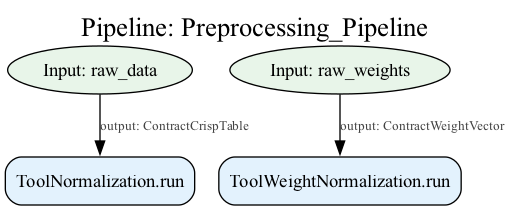
Advanced Visualization Options
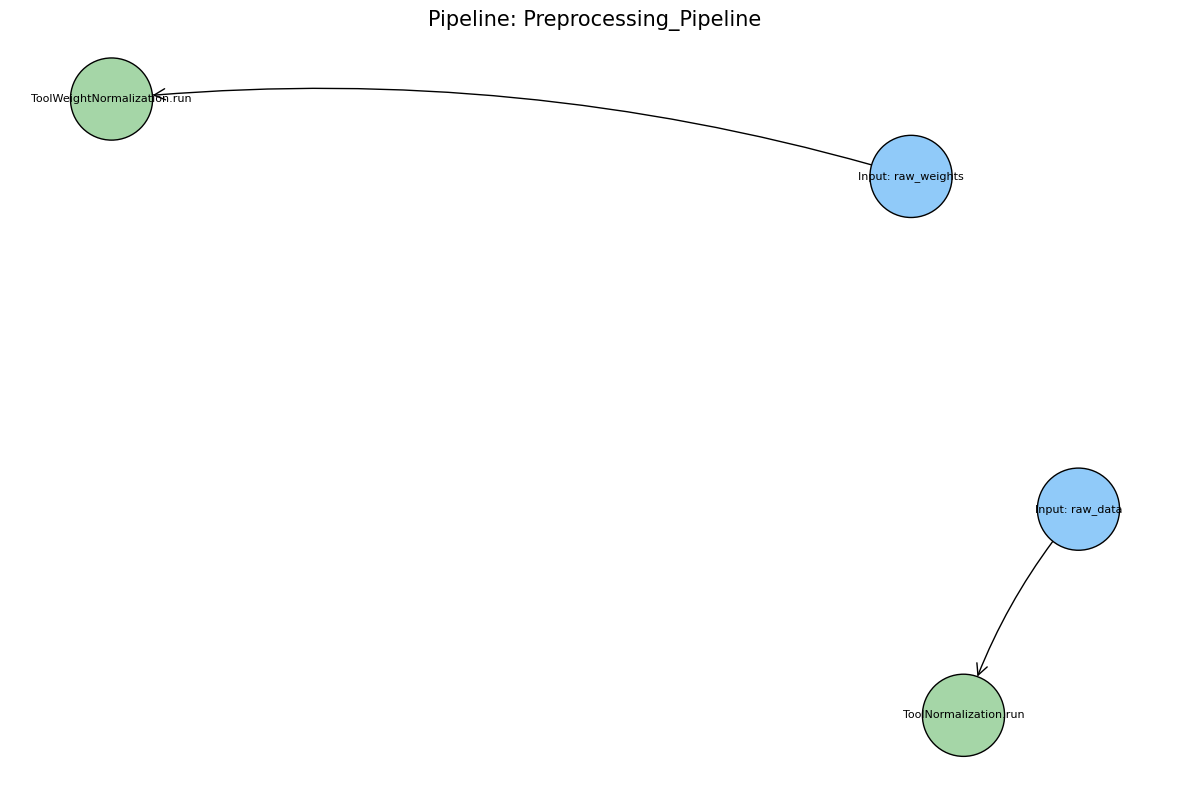
The visualization system offers extensive customization through parameter configuration:
# High-resolution SVG output with custom styling
custom_styles = {
    'input': {'fillcolor': 'lightblue', 'style': 'filled'},
    'component': {'fillcolor': 'lightgreen', 'style': 'filled'},
    'pipeline': {'fillcolor': 'lightyellow', 'style': 'filled'}
}

pipeline.visualize(
    filename="detailed_pipeline.svg",
    output_format='svg',
    show_contracts=True,
    engine='graphviz',
    styles=custom_styles
)

# Interactive display in Jupyter notebooks
# Returns IPython.display.Image object for inline display
image = pipeline.visualize(show_contracts=False, engine='matplotlib')
Parameter Configuration:
filename: Output file path (None for inline display)output_format: Image format (‘png’, ‘svg’, ‘pdf’)show_contracts: Display contract information on edgesengine: Rendering backend (‘auto’, ‘graphviz’, ‘matplotlib’)styles: Custom node styling dictionary
Visualization Benefits
Pipeline Documentation: Visual diagrams serve as living documentation that automatically reflects pipeline structure changes, ensuring documentation accuracy.
Debugging Support: Complex dependency relationships become immediately apparent through visual inspection, facilitating rapid identification of structural issues.
Communication Tool: Graphical representations enable effective communication of analytical workflows to stakeholders with varying technical backgrounds.
Educational Value: Visual DAGs help developers understand the relationship between declarative pipeline construction and the underlying computational graph execution model.
The visualization system integrates seamlessly with Jupyter notebook environments, providing immediate visual feedback during interactive pipeline development and experimentation.
Data Flow and Contract Integration
The axisfuzzy.analysis system implements a sophisticated data flow architecture that combines type-safe contract validation with flexible component communication patterns. This design ensures data integrity while enabling complex analytical workflows through automatic dependency resolution and runtime validation.
Contract System Integration
Type-Safe Data Validation: The contract system provides runtime validation that goes beyond
Python’s native type hints. Each component method decorated with @contract automatically
validates input data against predefined contract specifications, ensuring data structure compliance
before execution.
from axisfuzzy.analysis.contracts import contract
from axisfuzzy.analysis.build_in import ContractCrispTable, ContractWeightVector
from axisfuzzy.analysis.component.base import AnalysisComponent

class CustomAnalyzer(AnalysisComponent):
    def get_config(self):
        return {'name': 'CustomAnalyzer'}

    @contract
    def run(self, data: ContractCrispTable, weights: ContractWeightVector) -> ContractCrispTable:
        # Contract validation occurs automatically before this method executes
        # data is guaranteed to be a valid DataFrame with numerical values
        # weights is guaranteed to be a valid numpy array with positive values
        return data * weights
Contract Inheritance and Compatibility: The contract system supports inheritance hierarchies that enable polymorphic data handling. Components can accept more general contracts while maintaining compatibility with specialized data types.
# ContractNormalizedWeights inherits from ContractWeightVector
# Components accepting ContractWeightVector can also process ContractNormalizedWeights

@contract
def process_weights(weights: ContractWeightVector) -> float:
    return weights.sum()

# Both calls are valid due to contract inheritance
result1 = process_weights(raw_weights)      # ContractWeightVector
result2 = process_weights(normalized_weights)  # ContractNormalizedWeights
Component Communication Patterns
Dependency Graph Construction: Pipeline components communicate through a declarative dependency
graph where data flows are established during pipeline construction rather than execution. The
FuzzyPipeline.add() method automatically resolves dependencies by mapping parameter names to
upstream component outputs.
from axisfuzzy.analysis.pipeline import FuzzyPipeline
from axisfuzzy.analysis.component.basic import ToolNormalization, ToolStatistics

# Automatic dependency resolution through parameter mapping
pipeline = FuzzyPipeline(name="Data Processing")

input_data = pipeline.input("dataset", contract=ContractCrispTable)
normalizer = ToolNormalization(method='min_max')
analyzer = ToolStatistics(axis=1)
normalized = pipeline.add(normalizer.run, data=input_data)
statistics = pipeline.add(analyzer.run, data=normalized)  # Depends on normalizer output

# Pipeline automatically constructs: input_data → normalizer → analyzer
Multi-Input/Multi-Output Scenarios: Components can consume multiple inputs and produce multiple outputs through dictionary-based result structures. The pipeline system automatically handles output unpacking and routing to downstream components.
from typing import Dict

class DataSplitter(AnalysisComponent):
    def __init__(self, split_ratio=0.8):
        super().__init__()
        self.split_ratio = split_ratio

    def get_config(self):
        return {'name': 'DataSplitter', 'split_ratio': self.split_ratio}

    @contract
    def run(self, data: ContractCrispTable) -> Dict[str, ContractCrispTable]:
        split_point = int(len(data) * self.split_ratio)
        return {
            'training_data': data.iloc[:split_point],
            'validation_data': data.iloc[split_point:]
        }

# Multiple outputs accessed by name
splitter_output = pipeline.add(splitter.run, data=input_data)
training_result = pipeline.add(trainer.run, data=splitter_output['training_data'])
validation_result = pipeline.add(validator.run, data=splitter_output['validation_data'])
Pipeline Nesting Support: The system supports nested pipeline architectures where entire pipelines can be embedded as components within larger workflows. This enables modular design and reusable analytical building blocks.
from axisfuzzy.analysis.pipeline import FuzzyPipeline
from axisfuzzy.analysis.component.basic import ToolNormalization

# Create sub-pipeline for data preprocessing
preprocessing_pipeline = FuzzyPipeline(name="Preprocessing")
prep_input = preprocessing_pipeline.input("raw_data", contract=ContractCrispTable)
normalizer = ToolNormalization(method='min_max')
prep_output = preprocessing_pipeline.add(normalizer.run, data=prep_input)

# Embed sub-pipeline in main workflow
main_pipeline = FuzzyPipeline(name="Main Analysis")
main_input = main_pipeline.input("dataset", contract=ContractCrispTable)
preprocessed = main_pipeline.add(preprocessing_pipeline.run, raw_data=main_input)
analyzer = CustomAnalyzer()
final_result = main_pipeline.add(analyzer.run, data=preprocessed)
Runtime Validation and Error Detection
Contract Enforcement: During pipeline execution, the parse_step_inputs() method performs runtime
contract validation for each component input. This validation occurs after dependency resolution but
before component execution, ensuring that contract violations are detected early with detailed error messages.
# Runtime validation example (internal pipeline mechanism)
def parse_step_inputs(step_meta: StepMetadata, state: Dict[str, Any]) -> Dict[str, Any]:
    parsed_inputs = {}

    # Resolve dependencies and validate contracts
    for arg_name, data in parsed_inputs.items():
        if arg_name in step_meta.input_contracts:
            expected_contract = step_meta.input_contracts[arg_name]
            if not expected_contract.validate(data):
                raise TypeError(
                    f"Contract validation failed for '{step_meta.display_name}' "
                    f"on input '{arg_name}'. Expected '{expected_contract.name}'"
                )
Dependency Resolution: The pipeline system uses topological sorting to determine optimal execution order while detecting circular dependencies. This ensures that all component inputs are available before execution and prevents infinite loops in complex workflows.
Data Type Coercion: The contract system can perform automatic data type coercion when compatible transformations are available, reducing the need for explicit conversion steps in analytical workflows while maintaining type safety guarantees.
Pipeline Execution and Error Handling
The axisfuzzy.analysis pipeline execution system provides immutable state management and comprehensive error handling through a sophisticated execution model that separates pipeline definition from runtime execution while maintaining full observability and control.
Execution States
Immutable State Architecture
The ExecutionState class implements a functional programming paradigm where each execution step creates
a new state object rather than modifying existing state. This immutable design pattern ensures execution
reproducibility, enables safe concurrent access, and provides robust error recovery mechanisms.
import pandas as pd
from axisfuzzy.analysis.pipeline import FuzzyPipeline
from axisfuzzy.analysis.component.basic import ToolNormalization
from axisfuzzy.analysis.build_in import ContractCrispTable

# Create a simple pipeline
pipeline = FuzzyPipeline(name="StateDemo_Pipeline")
normalizer = ToolNormalization(method='min_max')

raw_data = pipeline.input("dataset", contract=ContractCrispTable)
normalized_data = pipeline.add(normalizer.run, data=raw_data)

# Initialize execution state
test_data = pd.DataFrame({'A': [1, 2, 3], 'B': [4, 5, 6]})
initial_state = pipeline.start_execution({"dataset": test_data})

# Each run_next() creates a new immutable state
state_after_step1 = initial_state.run_next()

# Original state remains unchanged - immutability guarantee
assert initial_state.current_index == 0
assert state_after_step1.current_index == 1
assert initial_state.latest_result is None
assert state_after_step1.latest_result is not None
State Transition and Control Flow
The execution state tracks pipeline progress through step indices, execution order, and result accumulation.
The is_complete() method and run_all() functionality provide both granular control and batch
execution capabilities.
# Manual state progression with comprehensive monitoring
current_state = pipeline.start_execution({"dataset": test_data})

while not current_state.is_complete():
    step_id = current_state.execution_order[current_state.current_index]
    step_info = current_state.pipeline.get_step_info(step_id)

    print(f"Executing: {step_info.display_name}")
    current_state = current_state.run_next()
    print(f"Completed step {current_state.current_index}/{len(current_state.execution_order)}")

# Alternative: batch execution for complete pipeline
final_state = initial_state.run_all()
final_result = final_state.latest_result
State Introspection and Debugging
The immutable state design enables powerful debugging capabilities by preserving execution history and providing access to intermediate results at any point in the pipeline execution.
# Access intermediate results for debugging
execution_state = pipeline.start_execution({"dataset": test_data})

# Execute first step and inspect
state_1 = execution_state.run_next()
intermediate_result = state_1.latest_result

print(f"Step 1 result shape: {intermediate_result.shape}")
print(f"Step 1 result type: {type(intermediate_result)}")

# State provides complete execution context
print(f"Execution progress: {state_1.current_index}/{len(state_1.execution_order)}")
print(f"Latest step ID: {state_1.latest_step_id}")
print(f"Available results: {list(state_1.step_results.keys())}")
Step-by-Step Iteration and Monitoring
Iterator-Based Execution Control: The FuzzyPipelineIterator provides a Python-native interface
for pipeline execution monitoring with detailed step information, timing data, and result access. This
enables integration with logging systems and interactive debugging tools.
import pandas as pd
import time
from axisfuzzy.analysis.pipeline import FuzzyPipeline
from axisfuzzy.analysis.component.basic import ToolNormalization
from axisfuzzy.analysis.build_in import ContractCrispTable

# Create simple pipeline for demonstration
pipeline = FuzzyPipeline(name="Iterator_Demo")
normalizer = ToolNormalization(method='min_max')

raw_data = pipeline.input("dataset", contract=ContractCrispTable)
normalized = pipeline.add(normalizer.run, data=raw_data)

# Test data
test_data = pd.DataFrame({'A': [1, 2, 3], 'B': [4, 5, 6]})

# Step-by-step execution with iterator
print("Executing pipeline step by step...")
for step in pipeline.step_by_step({"dataset": test_data}):
    print(f"Step {step['step_index'] + 1}/{step['total_steps']}: {step['step_name']}")
    print(f"Execution time: {step['execution_time']:.4f}s")
    print(f"Result type: {type(step['result']).__name__}")
    if hasattr(step['result'], 'shape'):
        print(f"Result shape: {step['result'].shape}")
Real-Time Execution Monitoring: The iterator pattern enables real-time observation of analytical processes with access to intermediate results, execution timing, and step metadata.
# Progress tracking with execution monitoring
import time

# Create pipeline with multiple steps
df = pd.DataFrame({'A': [1, 2, 3, 4], 'B': [10, 20, 30, 40]})
pipeline = FuzzyPipeline(name="Progress_Pipeline")
dataset_input = pipeline.input("dataset", contract=ContractCrispTable)
normalizer = ToolNormalization(method='min_max')
normalized_output = pipeline.add(normalizer.run, data=dataset_input)

# Execute with detailed monitoring
start_time = time.time()
for step_info in pipeline.step_by_step({"dataset": df}):
    current = step_info['step_index'] + 1
    total = step_info['total_steps']
    progress = current / total * 100
    elapsed = time.time() - start_time

    print(f"[{current}/{total}] {progress:.1f}% - {step_info['step_name']}")
    print(f"Step time: {step_info['execution_time']:.4f}s")
    print(f"Total elapsed: {elapsed:.4f}s")

    # Inspect intermediate results
    if hasattr(step_info['result'], 'shape'):
        print(f"Output shape: {step_info['result'].shape}")
    print("-" * 40)
Error Handling and Recovery Mechanisms
Contract Validation Errors: The system provides detailed error messages for contract validation failures, including the specific component, input parameter, expected contract, and received data type. This enables rapid debugging of data flow issues.
try:
    result = pipeline.run(invalid_data)
except TypeError as e:
    # Detailed contract validation error
    # "Runtime contract validation failed for 'DataNormalizer' on input 'data'.
    #  Expected 'ContractCrispTable', but received object of type str."
    print(f"Contract validation error: {e}")
Dependency Resolution Errors: Circular dependency detection occurs during pipeline construction
using topological sorting algorithms. The system raises ValueError exceptions with clear
descriptions of the problematic dependency cycles.
try:
    # This would create a circular dependency
    step_a = pipeline.add(component_a.run, data=step_b)
    step_b = pipeline.add(component_b.run, data=step_a)  # Circular reference
    pipeline.run(input_data)
except ValueError as e:
    # "A cycle was detected in the pipeline graph."
    print(f"Dependency error: {e}")
Execution State Recovery: The immutable state design enables safe error recovery by maintaining valid execution states even when individual steps fail. Applications can implement retry logic or alternative execution paths based on intermediate state information.
# Robust execution with error recovery
def execute_with_retry(pipeline, input_data, max_retries=3):
    for attempt in range(max_retries):
        try:
            return pipeline.run(input_data)
        except Exception as e:
            if attempt == max_retries - 1:
                raise e
            print(f"Attempt {attempt + 1} failed: {e}. Retrying...")
            time.sleep(1)  # Brief delay before retry
Iterator State Management: The iterator maintains execution state internally and provides seamless integration with Python’s iteration protocol while preserving immutable state guarantees.
# Iterator provides access to execution state
iterator = pipeline.step_by_step({"dataset": test_data})

# Manual step execution with state inspection
step_info = next(iterator)
print(f"Completed: {step_info['step_name']}")
print(f"Progress: {step_info['step_index'] + 1}/{step_info['total_steps']}")

# Early termination based on conditions
for step_info in pipeline.step_by_step({"dataset": test_data}):
    if step_info['execution_time'] > 1.0:  # Stop if step takes too long
        print("Terminating due to long execution time")
        break
    print(f"Step {step_info['step_index'] + 1} completed successfully")
Component-Level Error Isolation: Individual component failures are isolated within the execution framework, preventing cascade failures and enabling partial pipeline execution with graceful degradation.
The execution and error handling architecture balances computational efficiency with developer experience, providing powerful abstractions that simplify complex workflow construction while maintaining the flexibility and robustness required for advanced analytical scenarios.
Custom Component Development Guide
This section provides comprehensive guidelines for developing custom analysis components that integrate seamlessly with the AxisFuzzy pipeline framework.
Development Best Practices
Component Design Principles: Custom components should inherit from AnalysisComponent and
follow the single-responsibility principle. Each component should perform one well-defined analytical
operation with clear input-output contracts.
from axisfuzzy.analysis.component.base import AnalysisComponent
from axisfuzzy.analysis.contracts import contract
from axisfuzzy.analysis.build_in import ContractCrispTable, ContractWeightVector

class CustomAnalyzer(AnalysisComponent):
    """Custom component for specialized analysis."""

    def __init__(self, threshold: float = 0.5, method: str = 'default'):
        self.threshold = threshold
        self.method = method

    def get_config(self) -> dict:
        """Return serializable configuration."""
        return {'threshold': self.threshold, 'method': self.method}
Immutable State Management: Components should maintain immutable state after initialization.
All configuration parameters should be set during construction and exposed through get_config()
for serialization support.
Contract Integration
Type-Safe Component Implementation: Use the @contract() decorator to enforce input-output
type safety. This provides automatic validation and clear API documentation.
@contract
def run(self, data: ContractCrispTable, weights: ContractWeightVector) -> ContractWeightVector:
    """
    Execute analysis with contract-enforced type safety.

    Parameters
    ----------
    data : ContractCrispTable
        Input numerical DataFrame for analysis.
    weights : ContractWeightVector
        Weight vector for computation.

    Returns
    -------
    ContractWeightVector
        Computed result vector.
    """
    # Implementation with automatic contract validation
    result = self._compute_analysis(data, weights)
    return result
Custom Contract Definition: For specialized data types, define custom contracts using
the Contract framework with appropriate validation functions.
from axisfuzzy.analysis.contracts import Contract

# Define custom contract for specialized data structure
ContractCustomData = Contract(
    'ContractCustomData',
    lambda obj: hasattr(obj, 'special_attribute') and len(obj) > 0
)
Configuration Management
Proper get_config() Implementation: The get_config() method must return a JSON-serializable
dictionary containing all parameters necessary to reconstruct the component state.
def get_config(self) -> dict:
    """Return complete component configuration."""
    config = {
        'threshold': self.threshold,
        'method': self.method,
        'advanced_params': self.advanced_params.copy()  # Deep copy for safety
    }
    # Handle complex objects that need special serialization
    if hasattr(self, 'model'):
        config['model_state'] = self.model.serialize()
    return config
Parameter Validation: Implement robust parameter validation in the constructor to ensure component reliability and provide clear error messages for invalid configurations.
Testing Strategies
Unit Testing Approach: Test components in isolation using mock data that satisfies the required contracts. Focus on edge cases and parameter boundary conditions.
import pytest
import pandas as pd

def test_custom_analyzer():
    # Create test data satisfying contracts
    test_data = pd.DataFrame({'A': [1, 2, 3], 'B': [4, 5, 6]})
    test_weights = pd.Series([0.3, 0.7])

    analyzer = CustomAnalyzer(threshold=0.6)
    result = analyzer.run(test_data, test_weights)

    # Verify output contract compliance
    assert isinstance(result, pd.Series)
    assert len(result) == len(test_data)
Integration Testing: Test components within pipeline contexts to verify contract compatibility and execution flow integrity.
Performance Considerations
Optimization Guidelines: Implement efficient algorithms with consideration for large datasets. Use vectorized operations when working with numerical data and avoid unnecessary data copying.
def _compute_analysis(self, data, weights):
    """Optimized computation using vectorized operations."""
    # Use in-place operations where possible
    normalized_data = data.copy()  # Explicit copy for safety

    # Vectorized computation for performance
    result = (normalized_data * weights).sum(axis=1)

    # Memory-efficient processing for large datasets
    if len(data) > 10000:
        result = self._chunked_processing(data, weights)

    return result
Memory Management: For large-scale analysis, implement chunked processing and consider memory usage patterns. Use generators for streaming data processing when appropriate.
The component development framework provides a robust foundation for creating reusable, type-safe analytical tools that integrate seamlessly with the AxisFuzzy pipeline ecosystem while maintaining high performance and reliability standards.
Fully customize pipelines and visualization
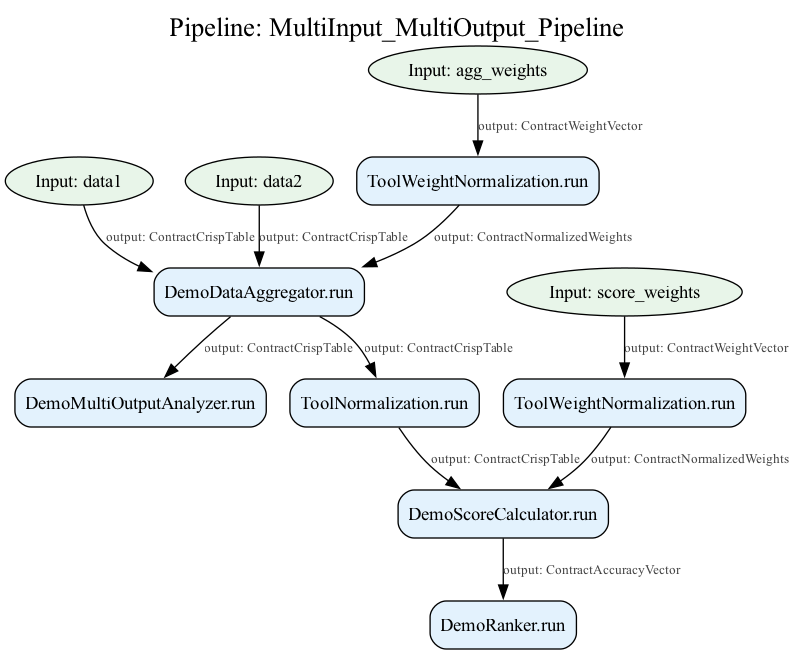
This subsection contains a complete example of a custom component and pipeline construction, and demonstrates a complex visual DAG flow chart of the built pipeline.
1. Custom contracts and components
from typing import Dict

import pandas as pd
import numpy as np

from axisfuzzy.analysis.build_in import ContractWeightVector, ContractCrispTable, ContractStatisticsDict, \
    ContractNormalizedWeights
from axisfuzzy.analysis import contract, Contract, AnalysisComponent

# Additional demo contracts
ContractAccuracyVector = Contract(
    'ContractAccuracyVector',
    lambda obj: isinstance(obj, (pd.Series, np.ndarray)) and len(obj) > 0,
    parent=ContractWeightVector
)

ContractOrderResult = Contract(
    'ContractOrderResult',
    lambda obj: isinstance(obj, pd.Series) and obj.dtype in ['int64', 'float64']
)

ContractMultiMetrics = Contract(
    'ContractMultiMetrics',
    lambda obj: isinstance(obj, dict) and all(isinstance(v, (int, float)) for v in obj.values())
)


class DemoScoreCalculator(AnalysisComponent):
    """
    Calculates composite scores from data and weights.

    Parameters
    ----------
    score_method : str, default 'weighted_sum'
        Method for score calculation.
    """

    def __init__(self, score_method: str = 'weighted_sum'):
        valid_methods = ['weighted_sum', 'geometric_mean']
        if score_method not in valid_methods:
            raise ValueError(f"Method must be one of {valid_methods}")
        self.score_method = score_method

    def get_config(self) -> dict:
        """Returns the component's configuration."""
        return {'score_method': self.score_method}

    @contract
    def run(self, data: ContractCrispTable, weights: ContractNormalizedWeights) -> ContractAccuracyVector:
        """
        Calculates composite scores.

        Parameters
        ----------
        data : ContractCrispTable
            Input data matrix.
        weights : ContractNormalizedWeights
            Normalized weights for criteria.

        Returns
        -------
        ContractScoreVector
            Composite scores for each alternative.
        """
        if self.score_method == 'weighted_sum':
            scores = (data * weights).sum(axis=1)
        else:  # geometric_mean
            scores = np.power(np.prod(data ** weights, axis=1), 1 / len(weights))

        return pd.Series(scores, name='composite_score', index=data.index)


class DemoMultiOutputAnalyzer(AnalysisComponent):
    """
    Performs multiple analyses simultaneously (multi-output demo).
    """

    def __init__(self):
        pass

    def get_config(self) -> dict:
        """Returns the component's configuration."""
        return {}

    @contract
    def run(self, data: ContractCrispTable) -> Dict[str, ContractStatisticsDict]:
        """
        Performs multiple statistical analyses.

        Parameters
        ----------
        data : ContractCrispTable
            Input data for analysis.

        Returns
        -------
        Dict[str, ContractStatisticsDict]
            Multiple statistical summaries.
        """
        # Row-wise statistics
        row_stats = {
            'mean': float(data.mean(axis=1).mean()),
            'std': float(data.mean(axis=1).std()),
            'min': float(data.mean(axis=1).min()),
            'max': float(data.mean(axis=1).max())
        }

        # Column-wise statistics
        col_stats = {
            'mean': float(data.mean(axis=0).mean()),
            'std': float(data.mean(axis=0).std()),
            'min': float(data.mean(axis=0).min()),
            'max': float(data.mean(axis=0).max())
        }

        return {
            'row_statistics': row_stats,
            'column_statistics': col_stats
        }


class DemoRanker(AnalysisComponent):
    """
    Ranks alternatives based on scores.

    Parameters
    ----------
    ascending : bool, default False
        Whether to rank in ascending order.
    """

    def __init__(self, ascending: bool = False):
        self.ascending = ascending

    def get_config(self) -> dict:
        """Returns the component's configuration."""
        return {'ascending': self.ascending}

    @contract
    def run(self, scores: ContractAccuracyVector) -> ContractOrderResult:
        """
        Ranks alternatives based on scores.

        Parameters
        ----------
        scores : ContractScoreVector
            Input scores to rank.

        Returns
        -------
        ContractRankingResult
            Ranking results (1 = best).
        """
        return scores.rank(ascending=self.ascending, method='min').astype(int)


class DemoDataAggregator(AnalysisComponent):
    """
    Aggregates multiple data sources (multi-input demo).

    Parameters
    ----------
    aggregation_method : str, default 'average'
        Method for aggregating multiple inputs.
    """

    def __init__(self, aggregation_method: str = 'average'):
        valid_methods = ['average', 'weighted_average']
        if aggregation_method not in valid_methods:
            raise ValueError(f"Method must be one of {valid_methods}")
        self.aggregation_method = aggregation_method

    def get_config(self) -> dict:
        """Returns the component's configuration."""
        return {'aggregation_method': self.aggregation_method}

    @contract
    def run(self,
            data1: ContractCrispTable,
            data2: ContractCrispTable,
            weights: ContractNormalizedWeights = None) -> ContractCrispTable:
        """
        Aggregates multiple data sources.

        Parameters
        ----------
        data1 : ContractCrispTable
            First data source.
        data2 : ContractCrispTable
            Second data source.
        weights : ContractNormalizedWeights, optional
            Weights for weighted aggregation.

        Returns
        -------
        ContractCrispTable
            Aggregated data.
        """
        if self.aggregation_method == 'average':
            return (data1 + data2) / 2
        else:  # weighted_average
            if weights is None or len(weights) != 2:
                weights = np.array([0.5, 0.5])
            return data1 * weights[0] + data2 * weights[1]
2. Pipeline construction and execution, as well as visualization
from axisfuzzy.analysis.component.basic import ToolNormalization, ToolWeightNormalization
from axisfuzzy.analysis import FuzzyPipeline

print("\n" + "=" * 60)
print("Demo: Multiple Inputs -> Multiple Outputs")
print("=" * 60)

# Create components
aggregator = DemoDataAggregator(aggregation_method='weighted_average')
multi_analyzer = DemoMultiOutputAnalyzer()
normalizer = ToolNormalization(method='min_max', axis=0)
score_calculator = DemoScoreCalculator()
ranker = DemoRanker(ascending=False)
weight_normalizer = ToolWeightNormalization()

# Build pipeline
pipeline = FuzzyPipeline(name="MultiInput_MultiOutput_Pipeline")

# Define multiple inputs
data1 = pipeline.input("data1", contract=ContractCrispTable)
data2 = pipeline.input("data2", contract=ContractCrispTable)
agg_weights = pipeline.input("agg_weights", contract=ContractWeightVector)
score_weights = pipeline.input("score_weights", contract=ContractWeightVector)

# Process and aggregate data
normalized_agg_weights = pipeline.add(weight_normalizer.run, weights=agg_weights)
aggregated_data = pipeline.add(
    aggregator.run,
    data1=data1,
    data2=data2,
    weights=normalized_agg_weights
)

# Multiple analysis paths for multiple outputs
# Path 1: Statistical analysis
stats_results = pipeline.add(multi_analyzer.run, data=aggregated_data)

# Path 2: Scoring and ranking
normalized_data = pipeline.add(normalizer.run, data=aggregated_data)
normalized_score_weights = pipeline.add(weight_normalizer.run, weights=score_weights)
scores = pipeline.add(
    score_calculator.run,
    data=normalized_data,
    weights=normalized_score_weights
)
rankings = pipeline.add(ranker.run, scores=scores)

# Test data
test_data1 = pd.DataFrame({
    'A': [1, 2, 3, 4],
    'B': [10, 20, 30, 40],
    'C': [100, 200, 300, 400]
})
test_data2 = pd.DataFrame({
    'A': [2, 3, 4, 5],
    'B': [15, 25, 35, 45],
    'C': [150, 250, 350, 450]
})
test_agg_weights = np.array([0.6, 0.4])
test_score_weights = np.array([0.5, 0.3, 0.2])

# Run pipeline
result = pipeline.run({
    "data1": test_data1,
    "data2": test_data2,
    "agg_weights": test_agg_weights,
    "score_weights": test_score_weights
})

print(f"Input data1 shape: {test_data1.shape}")
print(f"Input data2 shape: {test_data2.shape}")
print(f"Output type: {type(result)}")
print(f"Output components: {list(result.keys()) if isinstance(result, dict) else 'Single output'}")
print("\nMultiple Outputs:")
if isinstance(result, dict):
    for key, value in result.items():
        print(f"\n{key}:")
        print(f"  Type: {type(value)}")
        if hasattr(value, 'shape'):
            print(f"  Shape: {value.shape}")
        print(f"  Value: {value}")
output:
============================================================
Demo: Multiple Inputs -> Multiple Outputs
============================================================
Input data1 shape: (4, 3)
Input data2 shape: (4, 3)
Output type: <class 'dict'>
Output components: ['DemoRanker.run', 'DemoMultiOutputAnalyzer.run']

Multiple Outputs:

DemoRanker.run:
Type: <class 'pandas.core.series.Series'>
Shape: (4,)
Value: 0    4
1    3
2    2
3    1
Name: composite_score, dtype: int64

DemoMultiOutputAnalyzer.run:
Type: <class 'dict'>
Value: {'row_statistics':
           {'mean': 99.96666666666667,
            'std': 47.76679460322481,
            'min': 44.46666666666667,
            'max': 155.46666666666667},
        'column_statistics':
           {'mean': 99.96666666666665,
            'std': 147.74540037961702,
            'min': 2.9000000000000004,
            'max': 270.0}}
3. Visualization
pipeline.visualize()
Note
The visualization is generated using graphviz (If not, by using matplotlip). If you encounter any issues with the visualization, please ensure that graphviz is installed and available in your system PATH.
Conclusion
The AxisFuzzy component-pipeline architecture represents a
sophisticated framework
for constructing modular, type-safe analytical workflows. Through the combination of
the AnalysisComponent foundation, comprehensive built-in component library,
and the FuzzyPipeline orchestration engine, developers can build complex data
analysis systems with minimal complexity.
Key Architectural Strengths:
Type Safety: Contract-driven validation ensures runtime correctness and clear API documentation
Modularity: Component-based design promotes code reuse and maintainable analytical workflows
Execution Control: Immutable state management and step-by-step iteration enable debugging and monitoring
Extensibility: Well-defined interfaces support custom component development and framework extension
Practical Benefits:
The framework balances developer productivity with computational efficiency, providing declarative pipeline construction while maintaining the performance characteristics required for large-scale fuzzy analysis. The separation of component logic from orchestration concerns enables teams to develop specialized analytical tools independently while ensuring seamless integration within the broader ecosystem.
Future Considerations:
This architecture establishes a foundation for advanced features including parallel execution, distributed computing, and automated optimization strategies, positioning AxisFuzzy as a scalable platform for sophisticated fuzzy logic applications in research and production environments.
The component-pipeline system transforms complex analytical requirements into manageable, composable units that collectively enable powerful fuzzy data analysis capabilities while maintaining the clarity and reliability essential for scientific computing applications.