Fuzzifier: From Crisp to Fuzzy
In axisfuzzy, the fuzzification system is a cornerstone of the library, designed for flexibility and
extensibility. It is orchestrated by the main Fuzzifier class, which acts
as a high-level interface for converting crisp inputs (like numbers, lists, or NumPy arrays) into fuzzy
representations such as Fuzznum and Fuzzarray.
This system is built on a modular architecture that leverages the Strategy Pattern. It allows users
to dynamically select from various fuzzification algorithms, each encapsulated within a
FuzzificationStrategy. These strategies are discovered
and managed by a singleton FuzzificationStrategyRegistry,
ensuring a consistent and extensible framework.
This document provides a comprehensive guide to the axisfuzzy fuzzifier, from its architectural principles to practical, hands-on examples.
Introduction to Fuzzification
What is Fuzzification?
Fuzzification is the process of transforming a crisp (i.e., precise, non-fuzzy) numerical value into a fuzzy set. It is the first and one of the most critical steps in any fuzzy logic system. While a crisp value represents a single point, a fuzzy set represents that value with a degree of membership over a range of possibilities, capturing the inherent ambiguity and imprecision of real-world concepts.
For example, instead of defining a “hot” temperature as a single value like 30°C, fuzzification allows us to represent it as a fuzzy set where different temperatures have varying degrees of “hotness.” A temperature of 28°C might have a membership degree of 0.8 to the “hot” set, while 25°C might have a degree of 0.4.
The Role of the Fuzzifier in axisfuzzy
In the axisfuzzy library, the Fuzzifier class serves as the central
engine for this transformation. It encapsulates the logic, algorithms, and configurations required to
convert crisp inputs—be it a single number, a list, or a NumPy array—into fuzzy numbers (Fuzznum)
or fuzzy arrays (Fuzzarray).
The design of the Fuzzifier is guided by two core principles: flexibility and extensibility. It allows users to easily select different fuzzification strategies and membership functions, while also providing a clear path for developers to extend the system with custom logic.
Architectural Deep Dive
The fuzzification subsystem in axisfuzzy is built upon a robust and modular architecture composed of three key components. This design promotes separation of concerns and leverages powerful design patterns to create a system that is both easy to use and easy to extend.
The Core Components
FuzzificationStrategy: This is an abstract base class (ABC) that defines the contract for all fuzzification algorithms. Any class that performs the actual conversion of a crisp value to a fuzzy number must inherit from this class and implement the abstractfuzzifymethod. This ensures a consistent interface across all strategies.FuzzificationStrategyRegistry: This is a singleton registry that discovers, stores, and manages all availableFuzzificationStrategyimplementations. It acts as a central lookup service, allowing theFuzzifierto find the appropriate strategy based on the fuzzy number type (mtype) and a chosenmethod. The registry is populated automatically using the@register_fuzzifierdecorator, making new strategies instantly available to the system upon definition.Fuzzifier: This is the primary user-facing class. It acts as a high-level orchestrator or a “facade” that coordinates the other components. When a user wants to perform fuzzification, they instantiate aFuzzifier, providing it with a membership function and specifying the desired strategy. TheFuzzifierthen consults the registry to find the correct strategy and delegates the actual fuzzification task to it.
To better visualize how these components interact, the following diagram illustrates the architectural flow:
Input: Crisp Value/Array
        |
        v
┌─────────────────────────────────────────────────────────────┐
│                    Fuzzifier                                │
│  ┌─────────────────┐    ┌─────────────────────────────────┐ │
│  │  Membership     │    │     Fuzzification Strategy      │ │
│  │  Function       │───▶│                                 │ │
│  │                 │    │                                 │ │
│  └─────────────────┘    └─────────────────────────────────┘ │
│                                    │                        │
└────────────────────────────────────┼────────────────────────┘
                                      v
                        Output: Fuzznum/Fuzzarray
Design Patterns in Action
The architecture elegantly employs two classic design patterns:
The Strategy Pattern: The relationship between the
Fuzzifierand the variousFuzzificationStrategyimplementations is a textbook example of the Strategy Pattern. TheFuzzifier(the context) is configured with a concrete strategy object. When itsfuzzifymethod is called, it delegates the call to the strategy object. This allows the algorithm used for fuzzification to be selected and swapped at runtime, completely decoupling the client (Fuzzifier) from the implementation of the algorithm (FuzzificationStrategy).The Singleton Pattern (for the Registry): The
FuzzificationStrategyRegistryis implemented as a singleton. This ensures that there is only one instance of the registry throughout the application’s lifecycle. A single, centralized registry guarantees that all parts of the system have a consistent view of the available strategies, preventing fragmentation and simplifying management. The globalget_registry_fuzzify()function provides access to this single instance.
This combination of components and design patterns results in a highly cohesive and loosely coupled system, which is fundamental to the maintainability and scalability of axisfuzzy.
FuzzificationStrategy: The Blueprint for Fuzzification
At the heart of the fuzzification engine is the FuzzificationStrategy
abstract base class (ABC). This class serves as a formal contract, or blueprint, for all fuzzification
algorithms within axisfuzzy. It ensures that every strategy, regardless of its internal complexity,
presents a consistent interface to the rest of the system, particularly to the Fuzzifier.
Core Responsibilities
The primary responsibilities of a FuzzificationStrategy are:
Defining the Algorithm: It must implement the logic for converting a crisp numerical input (a single number or an array) into a fuzzy number (
Fuzznum) or a fuzzy array (Fuzzarray).Interfacing with Membership Functions: It orchestrates the use of a
MembershipFunctionto calculate the membership degree(s) that form the basis of the resulting fuzzy number.Handling Fuzzy Number Specifics: It must correctly construct the target fuzzy number, respecting its mathematical constraints (e.g., for a QROFN, ensuring that \(\mu^q + \nu^q \le 1\)).
The fuzzify Method Contract
The central piece of the strategy is the abstract method fuzzify:
@abstractmethod
def fuzzify(self,
            x: Union[float, int, list, np.ndarray],
            mf_cls: type,
            mf_params_list: List[Dict]) -> Union[Fuzznum, Fuzzarray]:
    """
    Fuzzifies the input data.
    """
    pass
This method signature is the core contract:
x: The crisp input value(s). It can be a single scalar, a list, or a NumPy array, allowing for both single-value and vectorized operations.mf_cls: The class of the membership function to be used (e.g.,GaussianMF). The strategy is responsible for instantiating it.mf_params_list: A list of parameter dictionaries. This allows a single fuzzification call to use multiple variations of the same membership function, which is essential for creating hesitant fuzzy numbers or handling complex scenarios.Return Value: The method must return either a single
Fuzznuminstance (for scalar input) or aFuzzarray(for array-like input).
Strategy Identification
Each concrete strategy class is uniquely identified by two class attributes:
mtype: A string indicating the type of fuzzy number it produces (e.g.,'qrofn','qrohfn').method: A string naming the specific algorithm (e.g.,'linear','entropy','custom').
These attributes are not just labels; they are the keys used by the registry to store and retrieve the strategy, forming the foundation of the system’s automatic discovery mechanism.
FuzzificationStrategyRegistry: The Central Directory
The FuzzificationStrategyRegistry is the central nervous
system of the fuzzification module. It acts as a comprehensive directory or catalog of all available
FuzzificationStrategy implementations. Implemented as a singleton,
it ensures that there is one, and only one, source of truth for strategy discovery throughout the application.
Core Responsibilities
Strategy Registration: It provides a mechanism to register new strategy classes.
Strategy Discovery and Retrieval: It allows the
Fuzzifierto look up and retrieve the appropriate strategy class based on the desired fuzzy number type (mtype) and algorithm name (method).Default Management: It manages a default method for each fuzzy number type, simplifying the user experience.
The Automatic Registration and Discovery Mechanism
The most powerful feature of the registry is its seamless integration with the
register_fuzzifier() decorator. This decorator automates
the entire registration process.
from .registry import register_fuzzifier

@register_fuzzifier
class MyCustomStrategy(FuzzificationStrategy):
    # ... implementation ...
When Python loads this code, the decorator immediately calls the registry’s register method:
Key Methods of the Registry
The registry exposes several key methods for managing strategies:
register(mtype, method, strategy_cls, is_default=False): This is the core registration function, called automatically by the decorator. It maps the(mtype, method)tuple to thestrategy_cls. Ifis_defaultisTrue, it sets this method as the default for the givenmtype.get_strategy(mtype, method=None): This is the primary lookup method used by theFuzzifier. It retrieves the strategy class associated with the givenmtypeandmethod. Ifmethodis omitted, it intelligently falls back to the registered default method for thatmtype. This allows users to simply specify a fuzzy number type (like'qrofn') and get the most common or recommended fuzzification algorithm for it without needing to know the specific method name.list_strategies(mtype=None): Provides a list of all registered(mtype, method)tuples, allowing for introspection and discovery of available capabilities.get_available_mtypes()andget_available_methods(mtype): These helper methods make it easy to query which fuzzy number types are supported and what methods are available for each type.
Decoupling in Action
The registry, in combination with the strategy pattern, creates a beautifully decoupled architecture.
The Fuzzifier does not need to know about any concrete strategy classes. It only communicates with
the registry, asking for a strategy that matches the user’s request.
This design means that developers can add entirely new fuzzification algorithms to axisfuzzy without
ever touching the core Fuzzifier code. As long as a new strategy adheres to the
FuzzificationStrategy contract and is registered with the decorator,
it instantly becomes available throughout the system.
Using the Fuzzifier
This section provides a practical, step-by-step guide to using the Fuzzifier.
We will cover everything from the initial setup to creating a Fuzzifier instance, performing the actual
fuzzification, and interpreting the results. The design of the Fuzzifier emphasizes flexibility, allowing
you to configure it in several ways to best suit your application’s needs.
Creating a Fuzzifier Instance: Three Core Approaches
Instantiating a Fuzzifier is a declarative process. You specify what you want to achieve,
and the Fuzzifier handles the how. The constructor’s flexibility shines in how you define the membership
function (mf), which can be done in three distinct ways.
The general constructor signature is:
Fuzzifier(mf, mtype=None, method=None, **kwargs)
Key Parameters:
mf: The membership function definition. This can be an instance, a class, or a string name.mtype: A string specifying the target fuzzy number type (e.g.,'qrofn','qrohfn').method: A string specifying the fuzzification strategy. If omitted, the registered default for themtypeis used.**kwargs: A flexible set of keyword arguments, including:mf_params: Crucially, this dictionary (or list of dictionaries) provides the parameters for the membership function whenmfis a class or a name.Other parameters required by the chosen strategy (e.g.,
qfor q-rung orthopair fuzzy numbers).
Let’s explore the three approaches to providing mf.
Approach 1: By Membership Function Instance (The Direct Approach)
This is the most direct method. You create and configure an instance of a MembershipFunction
subclass first, and then pass it to the Fuzzifier. The Fuzzifier will automatically infer the parameters from the instance.
from axisfuzzy.fuzzifier import Fuzzifier
from axisfuzzy.membership import GaussianMF

# Step 1: Create a pre-configured membership function instance
mf_instance = GaussianMF(sigma=4.0, c=20.0)

# Step 2: Pass the instance to the Fuzzifier.
# Parameters are automatically inferred. No `mf_params` needed.
fuzz_engine = Fuzzifier(
    mf=mf_instance,
    mtype='qrofn',
    q=3
)

print(f"Engine created with instance: {fuzz_engine}")
Approach 2: By Membership Function Class (The Declarative Approach)
This approach is more declarative. You provide the membership function class itself (e.g., GaussianMF) and
supply its parameters separately through the mf_params keyword argument. This keeps the configuration
centralized in the Fuzzifier constructor.
from axisfuzzy.fuzzifier import Fuzzifier
from axisfuzzy.membership import GaussianMF

# Pass the class and its parameters separately
fuzz_engine = Fuzzifier(
    mf=GaussianMF,
    mtype='qrofn',
    q=3,
    mf_params={'sigma': 4.0, 'c': 20.0}  # Parameters for GaussianMF
)

print(f"Engine created with class: {fuzz_engine}")
Approach 3: By Membership Function Name (The Dynamic Approach)
This is the most flexible method, ideal for dynamic configurations (e.g., loading from a JSON or YAML file).
You provide the registered string name or alias of the membership function (e.g., 'gaussmf') and
its parameters via mf_params.
from axisfuzzy.fuzzifier import Fuzzifier

# Use the registered name 'gaussmf'
fuzz_engine = Fuzzifier(
    mf='gaussmf',
    mtype='qrofn',
    q=3,
    mf_params={'sigma': 4.0, 'c': 20.0}
)

print(f"Engine created with name: {fuzz_engine}")
This approach decouples your code from specific class imports, making it highly adaptable.
Performing Fuzzification
Once instantiated, the Fuzzifier object is callable, meaning you can use it like a function.
It seamlessly handles single values, lists, or NumPy arrays, always returning the appropriate fuzzy representation.
import numpy as np

# Assuming `fuzz_engine` is one of the Fuzzifiers created above.

# a. Fuzzify a single crisp value
crisp_value = 18.0
fuzzy_number = fuzz_engine(crisp_value)

print(f"Crisp input: {crisp_value}")
print(f"Fuzzy output: {fuzzy_number}")
print(f"Type of output: {type(fuzzy_number)}")

# b. Fuzzify a NumPy array
crisp_array = np.array([15.0, 20.0, 25.0])
fuzzy_array = fuzz_engine(crisp_array)

print(f"\nCrisp array input: {crisp_array}")
print(f"Fuzzy array output: {fuzzy_array}")
print(f"Type of output: {type(fuzzy_array)}")
Interpreting the Result
The output of a fuzzification operation is either a Fuzznum (for a single input) or
a Fuzzarray (for an array input).
A Fuzznum is a structured object that holds the membership degree (md),
non-membership degree (nmd)(example for qrofn).
For our qrofn example, the fuzz_engine would perform the following internal steps when called with \(x = 18.0\):
Calculate Membership Degree: It computes
md = GaussianMF(sigma=4.0, c=20.0).compute(18.0).Apply Fuzzification Strategy: The chosen
qrofnstrategy then uses thismdand theq=3parameter to calculate thenmd. For a standardqrofn, this is typicallynmd = (1 - md**q)**(1/q).Construct Fuzznum: It returns a
Fuzznumobject containing the calculatedmdandnmd.
The resulting fuzzy number encapsulates the input’s belongingness to the fuzzy set defined by the Gaussian curve, providing a rich, nuanced representation compared to the original crisp value.
Handling Complex Scenarios: Multiple Membership Functions
A powerful feature of the Fuzzifier is its ability to handle multiple membership function definitions for a
single fuzzification task. This is particularly important for creating Hesitant Fuzzy Numbers (like qrohfn),
where a single crisp value is mapped to multiple membership degrees, reflecting uncertainty or expert disagreement.
This is achieved by passing a list of dictionaries to the mf_params argument.
Use Case: Creating a Q-Rung Orthopair Hesitant Fuzzy Number (qrohfn)
Let’s configure a Fuzzifier to evaluate a score based on three different perspectives: pessimistic, neutral,
and optimistic. Each perspective is represented by a different Gaussian membership function.
from axisfuzzy.fuzzifier import Fuzzifier

# Configure a Fuzzifier for a hesitant fuzzy scenario
hesitant_fuzzifier = Fuzzifier(
    mf='gaussmf',
    mtype='qrohfn',  # Target: q-rung Orthopair Hesitant Fuzzy Number
    q=2,
    mf_params=[
        {'sigma': 0.1, 'c': 0.3},  # Pessimistic view
        {'sigma': 0.1, 'c': 0.5},  # Neutral view
        {'sigma': 0.1, 'c': 0.7}   # Optimistic view
    ]
)

# Fuzzify a single score
score = 0.45
hesitant_fuzzy_number = hesitant_fuzzifier(score)

print(f"Crisp score: {score}")
print(f"Hesitant Fuzzy Number: {hesitant_fuzzy_number}")
Output
Crisp score: 0.45
Hesitant Fuzzy Number: <[0.0439, 0.3247, 0.8825],[0.1]>
When hesitant_fuzzifier is called, it computes the membership degree for the input score 0.45 against
each of the three Gaussian functions, resulting in a Fuzznum that contains a set of membership degrees,
capturing the full spectrum of the hesitant evaluation.
Note
Critical Difference: QROFN vs QROHFN Multi-Parameter Fuzzification
When using multiple membership function parameters (mf_params as a list), there is a fundamental
difference between qrofn and qrohfn fuzzification strategies:
QROFN (Q-Rung Orthopair Fuzzy Numbers): Multiple parameters create separate fuzzy numbers that are stacked together, resulting in a
Fuzzarraywith an additional dimension. For example, if you fuzzify a 2D NumPy array with 3 parameter sets, the result will be a 3DFuzzarray.QROHFN (Q-Rung Orthopair Hesitant Fuzzy Numbers): Multiple parameters are fused into a single hesitant fuzzy number, maintaining the same dimensionality as the input. The same 2D array with 3 parameter sets results in a 2D
Fuzzarraywhere each element contains multiple membership degrees.
This distinction is crucial for high-dimensional data processing and affects the shape of your output arrays. Choose the appropriate fuzzy number type based on whether you need separate evaluations (QROFN) or hesitant/uncertain evaluations (QROHFN).
Batch Processing of Array-Like Data
The Fuzzifier is optimized for performance and can seamlessly process not just single values, but
also NumPy arrays and lists of numbers. When an array-like input is provided, the fuzzifier
applies the same membership function(s) to every element in the array, returning a list of Fuzznum objects.
This vectorization-like capability is highly efficient for batch processing tasks, such as fuzzifying an entire dataset column.
import numpy as np
from axisfuzzy.fuzzifier import Fuzzifier

# Fuzzifier for 'medium' values
fuzzifier = Fuzzifier(mf='gaussmf', mf_params={'sigma': 0.1, 'c': 0.5})

# A dataset of crisp values
crisp_data = np.array([0.1, 0.48, 0.52, 0.9, 0.3])

# Fuzzify the entire array in one go
fuzzy_results = fuzzifier(crisp_data)

# The output is a list of Fuzznum objects
for crisp, fuzzy in zip(crisp_data, fuzzy_results):
    print(f"Crisp: {crisp:.2f} -> Fuzzy: {fuzzy}")
This demonstrates how easily the Fuzzifier scales from single data points to large datasets,
making it a powerful tool for data analysis and feature engineering pipelines.
Advanced Features
This section delves into the advanced capabilities of the Fuzzifier,
specifically its support for serialization and visualization. These features are designed to enhance
portability, reproducibility, and analytical insight.
Serialization for Portability
A key feature of the Fuzzifier is its ability to be serialized. This means you can save the complete
configuration of a Fuzzifier instance—including its membership function, strategy, and all associated
parameters—and then perfectly reconstruct it later. This is invaluable for model persistence, sharing
configurations, and ensuring reproducibility in experiments.
This functionality is provided by two paired methods: get_config()
and from_config().
get_config(): This instance method returns a serializable dictionary containing all the information required to recreate theFuzzifier.from_config(): This class method takes a configuration dictionary (generated by get_config) and returns a new Fuzzifier instance with the exact same configuration.
Practical Use Case: Model Persistence and Sharing
Imagine you have configured a complex Fuzzifier for a specific data analysis task.
You can save its configuration to a file (e.g., in JSON format) and load it back whenever needed,
without having to manually redefine it in your code.
import json
from axisfuzzy.fuzzifier import Fuzzifier

# 1. Create and configure a Fuzzifier
original_fuzzifier = Fuzzifier(
    mf='gaussmf',
    mtype='qrofn',
    q=2,
    mf_params={'sigma': 0.5, 'c': 0.5}
)

# 2. Get its configuration and save it to a file
config = original_fuzzifier.get_config()

with open('fuzzifier_config.json', 'w') as f:
    json.dump(config, f)

# ... later, in a different script or session ...

# 3. Load the configuration from the file
with open('fuzzifier_config.json', 'r') as f:
    loaded_config = json.load(f)

# 4. Reconstruct the Fuzzifier from the configuration
reconstructed_fuzzifier = Fuzzifier.from_config(loaded_config)

# The reconstructed Fuzzifier is identical to the original
print(f"Original: {original_fuzzifier}")
print(f"Reconstructed: {reconstructed_fuzzifier}")

# Verify that they produce the same output
crisp_value = 0.7
assert original_fuzzifier(crisp_value) == reconstructed_fuzzifier(crisp_value)
Visualization for Fuzzifier
Understanding the shape and position of the membership function(s) is crucial for interpreting the behavior of
your fuzzy system. The Fuzzifier provides a built-in plot()
method for this exact purpose.
This method visualizes the membership function(s) associated with the Fuzzifier instance over a specified range.
Using the plot() Method
The plot() method is straightforward to use. You can control the x-axis range and the number of points used for plotting.
from axisfuzzy.fuzzifier import Fuzzifier

# Create a Fuzzifier with multiple membership functions
# for a hesitant fuzzy scenario
hesitant_fuzzifier = Fuzzifier(
    mf='gaussmf',
    mtype='qrohfn',
    q=2,
    mf_params=[
        {'sigma': 0.1, 'c': 0.3},
        {'sigma': 0.05, 'c': 0.6},
        {'sigma': 0.1, 'c': 0.4}
    ]
)

# Visualize the underlying membership functions
hesitant_fuzzifier.plot(
    x_range=(0, 1),
    num_points=200,
    show=True  # Set to False if you want to customize the plot further
)
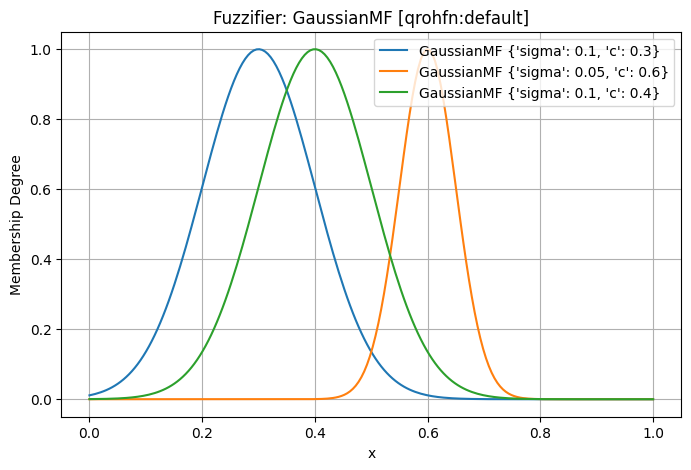
This will generate a plot showing the three Gaussian curves, allowing you to instantly see how they overlap and cover the input space.
Customizing Plots
The plot() method is built on top of matplotlib. While it provides a quick way to generate a
standard plot, you can easily create more advanced and customized visualizations. By setting
show=False, the plot is not immediately displayed, which allows you to access the current
matplotlib figure and axes to add custom titles, labels, annotations, or other elements before
finally showing it yourself.
Extending the System: Custom Fuzzification Strategies
The axisfuzzy fuzzification engine is designed for extensibility. While it comes with a set of standard,
built-in strategies, its true power lies in allowing users to define and integrate their own custom
fuzzification logic. This section guides you through the process of creating and registering your
own FuzzificationStrategy.
When to Build Your Own Strategy?
You should consider creating a custom strategy in any of the following scenarios:
Novel Fuzzy Number Types: If you are implementing a new type of fuzzy number that is not already supported by axisfuzzy, you will need to create a strategy to handle its specific membership and non-membership calculations.
Alternative Fuzzification Logic: You may have a theoretical model or a specific application requirement that defines the relationship between membership (
md) and non-membership (nmd) differently from the standard strategies. For example, you might wantnmdto be a function of bothmdand some external parameter.Domain-Specific Adjustments: In certain expert systems, the fuzzification process might need to incorporate domain-specific rules or heuristics that go beyond a simple mathematical transformation.
Performance Optimization: For performance-critical applications, you might design a highly optimized strategy that is tailored to a specific hardware architecture or numerical library.
A Step-by-Step Implementation Guide
Creating and integrating a new strategy is a straightforward process involving three key steps,
as illustrated by the built-in strategies for qrofn and qrohfn.
1. Define the Strategy Class
First, create a new Python class that inherits from the abstract base class
FuzzificationStrategy. Inside the class, you must define two class attributes:
mtype: A string that specifies the fuzzy number type this strategy is for (e.g., ‘qrofn’, ‘qrohfn’).method: A string that provides a unique name for this strategy within itsmtype(e.g., ‘default’, ‘pessimistic’).
from axisfuzzy.fuzzifier.strategy import FuzzificationStrategy

class MyCustomStrategy(FuzzificationStrategy):
    mtype = 'qrofn'  # Target fuzzy number type
    method = 'my_special_method' # Unique name for the strategy

    # ... implementation will go here ...
2. Implement the `fuzzify` Abstract Method
Next, you must implement the fuzzify method. This is the core of your strategy, containing the
logic to convert a crisp input into a fuzzy number or an array of fuzzy numbers.
The correct signature is:
from typing import Union, List, Dict
import numpy as np
from axisfuzzy.core import Fuzznum, Fuzzarray

def fuzzify(self,
            x: Union[float, int, list, np.ndarray],
            mf_cls: type,
            mf_params_list: List[Dict]) -> Union[Fuzznum, Fuzzarray]:
    # Your custom logic here
    # This method should process the crisp input `x` using the provided
    # membership function class (`mf_cls`) and its parameters (`mf_params_list`)
    # and return a Fuzznum or Fuzzarray.
    pass
Key parameters:
x: The crisp input value(s), which can be a single number, a list, or a NumPy array.mf_cls: The membership function class (e.g.,Gaussmf) to be used for calculating membership degrees.mf_params_list: A list of dictionaries, where each dictionary contains the parameters for one membership function instance (e.g.,[{'c': 0.5, 'sigma': 0.1}]).
3. Register the New Strategy
Finally, to make your strategy discoverable by the Fuzzifier, you must register it using the
register_fuzzifier() decorator. This decorator reads the mtype
and method attributes from your class to add it to the central registry.
The decorator can take one optional argument:
is_default(optional,bool): IfTrue, this strategy will become the default method for the specifiedmtype. This means it will be used when a user requests thatmtypewithout specifying amethod.
from axisfuzzy.fuzzifier import register_fuzzifier

@register_fuzzifier(is_default=False)
class MyCustomStrategy(FuzzificationStrategy):
    mtype = 'qrofn'
    method = 'my_special_method'

    def fuzzify(self, x, mf_cls, mf_params_list):
        # ... implementation ...
        pass
A Complete Example: The “Pessimistic” QROFN Strategy
Let’s create a complete, practical example. We will implement a “pessimistic” strategy for q-rung
Orthopair Fuzzy Numbers (qrofn). In this strategy, we’ll define the non-membership degree (nmd)
to be slightly higher than in the standard approach, reflecting a more cautious or “pessimistic” evaluation.
Let’s say our pessimistic nmd is defined as \((1 - md^q)^{1/q} + 0.1 * (1 - md)\), but capped at \((1 - md^q)^(1/q)\).
import numpy as np
from typing import Union, List, Dict

from axisfuzzy.core import Fuzznum, Fuzzarray, get_registry_fuzztype
from axisfuzzy.fuzzifier import FuzzificationStrategy, register_fuzzifier, Fuzzifier

# Step 1 & 3: Define and Register the Strategy
@register_fuzzifier
class PessimisticQROFNStrategy(FuzzificationStrategy):
    """
    A pessimistic fuzzification strategy for Q-Rung Orthopair Fuzzy Numbers (QROFNs).

    This strategy calculates a non-membership degree that is intentionally
    higher than the standard, reflecting a more cautious or "pessimistic"
    evaluation. It demonstrates how to inject custom logic into the
    fuzzification process.
    """
    mtype = 'qrofn'
    method = 'pessimistic'

    # The __init__ method is inherited from FuzzificationStrategy,
    # which already handles the 'q' parameter.

    def fuzzify(self,
                x: Union[float, int, list, np.ndarray],
                mf_cls: type,
                mf_params_list: List[Dict]) -> Union[Fuzznum, Fuzzarray]:
        """
        Implements the pessimistic fuzzification logic.
        """
        # For a simple QROFN, we usually work with a single membership function.
        # We'll extract the parameters for the first one.
        params = mf_params_list[0]
        mf = mf_cls(**params)
        x = np.asarray(x, dtype=float)

        # 1. Calculate the membership degree (md) from the crisp input.
        md = np.clip(mf.compute(x), 0, 1)

        # 2. Implement the custom "pessimistic" logic for non-membership (nmd).
        # The standard nmd is the maximum possible value given md.
        standard_nmd = (1 - md**self.q)**(1/self.q)

        # Our pessimistic adjustment slightly increases the non-membership degree.
        pessimistic_nmd = standard_nmd + 0.1 * (1 - md)

        # We must still respect the QROFN constraint: md^q + nmd^q <= 1.
        # So, we take the minimum of our adjusted value and the maximum allowed value.
        nmd = np.minimum(pessimistic_nmd, (1 - md**self.q)**(1/self.q))

        # 3. Create the final fuzzy number(s) using the backend system.
        backend_cls = get_registry_fuzztype().get_backend(self.mtype)
        backend = backend_cls.from_arrays(mds=md, nmds=nmd, q=self.q)
        arr = Fuzzarray(backend=backend, mtype=self.mtype, q=self.q)

        # Return a single Fuzznum if the input was a scalar.
        if x.ndim == 0:
            return arr[()]
        return arr
Now, let’s use our new strategy
# Create a Fuzzifier and specify our custom method
pessimistic_fuzzifier = Fuzzifier(
    mf='gaussmf',
    mtype='qrofn',
    method='pessimistic',  # <-- Here we select our new strategy
    q=3,
    mf_params={'sigma': 4.0, 'c': 20.0}
)

# For comparison, create a Fuzzifier using the default strategy
default_fuzzifier = Fuzzifier(
    mf='gaussmf',
    mtype='qrofn',
    method='default',      # <-- The standard, built-in strategy
    q=3,
    mf_params={'sigma': 4.0, 'c': 20.0}
)

crisp_value = 18.0
pessimistic_result = pessimistic_fuzzifier(crisp_value)
default_result = default_fuzzifier(crisp_value)

print(f"Crisp Input: {crisp_value}\n")
print(f"Default Strategy Output:     {default_result}")
print(f"Pessimistic Strategy Output: {pessimistic_result}")
print(f"\nNote how the 'pessimistic' result has a slightly higher non-membership degree (nmd).")
output:
Crisp Input: 18.0

Default Strategy Output:     <0.8825,0.678>
Pessimistic Strategy Output: <0.8825,0.6788>

Note how the 'pessimistic' result has a slightly higher non-membership degree (nmd).
By following this pattern, you can seamlessly extend axisfuzzy with powerful, domain-specific fuzzification logic, making the system adaptable to virtually any research or application need.
Conclusion
The axisfuzzy fuzzification system stands as a powerful and flexible engine for transforming crisp data into rich, nuanced fuzzy representations. Its design, rooted in the Strategy Pattern, provides a robust framework that is both easy to use for standard applications and highly extensible for advanced, domain-specific research.
Through this guide, we have explored the system from multiple perspectives:
Architectural Soundness: The clear separation of concerns between the
Fuzzifier,FuzzificationStrategy, and theFuzzificationStrategyRegistrycreates a maintainable and scalable system.Practical Application: We have demonstrated how to instantiate and use the
Fuzzifierfor converting single values and arrays intoFuzznumandFuzzarrayobjects.Advanced Capabilities: Features like serialization (
get_config/from_config) and visualization (plot) enhance model persistence, reproducibility, and analytical insight.Unlimited Extensibility: The ability to create and register custom fuzzification strategies ensures that axisfuzzy can evolve to meet the unique demands of any fuzzy logic application or theoretical model.