Fuzzy Operations: High-Performance Mathematical Computations
This document explores the sophisticated architecture that powers high-performance mathematical and logical operations on fuzzy numbers and arrays. A deep understanding of this framework is essential for harnessing the full capabilities of the library, from basic arithmetic to advanced fuzzy inference.
AxisFuzzy is engineered for both power and simplicity. It abstracts the complexities of fuzzy
mathematics through a robust, multi-layered system, allowing you to manipulate Fuzznum and Fuzzarray
objects with the same ease as standard Python numbers or NumPy arrays. This seamless experience is achieved through:
A Solid Mathematical Foundation: A comprehensive and extensible framework for triangular norms (t-norms) and t-conorms, providing the building blocks for all logical operations.
A Unified Operation Framework: A systematic approach to defining and registering operations for diverse fuzzy number types, ensuring consistency and extensibility.
A Centralized Dispatch System: An intelligent dispatcher that routes operations to the most efficient execution path, seamlessly handling interactions between fuzzy objects, scalars, and NumPy arrays.
High-Performance Backends: An architecture that delegates vectorized computations to specialized, mtype-specific backends, leveraging the power of NumPy for C-level performance.
This guide provides a deep dive into each of these components, illuminating the design principles that make AxisFuzzy a premier tool for fuzzy set theory research and application development.
Core Concepts: The triangular.py Module
At the core of fuzzy logic are the generalizations of Boolean operations (AND, OR) to the continuous domain of [0, 1]. These are known as triangular norms (t-norms) and triangular conorms (t-conorms). The axisfuzzy.core.triangular module provides a comprehensive, high-performance, and extensible framework for these fundamental building blocks.
What are T-Norms and T-Conorms?
T-Norms (Fuzzy AND): A t-norm, \(T(a, b)\), generalizes set intersection. It is a commutative, associative, and monotonic function with the boundary condition \(T(a, 1) = a\).
T-Conorms (Fuzzy OR): A t-conorm, \(S(a, b)\), generalizes set union. It shares the same properties but has the boundary condition \(S(a, 0) = a\).
They are duals under standard negation \(N(x) = 1 - x\), following De Morgan’s laws.
The OperationTNorm Factory
The primary entry point into this framework is the OperationTNorm class. It serves as a powerful factory and a
unified interface for creating, configuring, and executing all t-norm and t-conorm operations.
It is designed to be both powerful for researchers and easy to use for practitioners.
from axisfuzzy.core.triangular import OperationTNorm
import numpy as np

# 1. Create an operator for the 'einstein' t-norm family with q=2
einstein_op = OperationTNorm(norm_type='einstein', q=2)
Core Functionality
The operator provides methods for pairwise calculations and array-wide reductions.
Pairwise Operations
The t_norm and t_conorm methods perform element-wise operations on scalars or NumPy arrays.
# Perform scalar calculations
t_norm_result = einstein_op.t_norm(0.6, 0.7)
print(f"Einstein T-Norm (q=2): {t_norm_result:.3f}")

t_conorm_result = einstein_op.t_conorm(0.6, 0.7)
print(f"Einstein T-Conorm (q=2): {t_conorm_result:.3f}")

# Perform vectorized calculations with NumPy arrays
arr1 = np.array([0.1, 0.5, 0.9])
arr2 = np.array([0.2, 0.4, 0.8])
vectorized_result = einstein_op.t_norm(arr1, arr2)
print(f"Vectorized T-Norm (q=2): {np.round(vectorized_result, 3)}")
Reduction Operations
For aggregating an array of membership values, the framework provides highly efficient reduction methods:
t_norm_reduce and t_conorm_reduce. These use a tree-like reduction pattern (_pairwise_reduce)
to minimize computation steps, which is significantly faster than a sequential np.reduce.
data = np.array([0.2, 0.5, 0.8, 0.9])

# Reduce the array using the t-norm
reduced_t_norm = einstein_op.t_norm_reduce(data)
print(f"T-Norm Reduction: {reduced_t_norm:.3f}")

# Reduce the array using the t-conorm
reduced_t_conorm = einstein_op.t_conorm_reduce(data)
print(f"T-Conorm Reduction: {reduced_t_conorm:.3f}")
Introspection and Verification
The framework includes tools for inspecting the operator’s configuration and verifying its mathematical properties.
Getting Operator Information
The get_info method returns a dictionary with the current configuration of the operator.
info = einstein_op.get_info()
# Returns: {'norm_type': 'einstein', 'is_archimedean': True, ... 'q': 2, ...}
print(info)
Verifying De Morgan’s Laws
A crucial aspect of fuzzy logic is the duality between t-norms and t-conorms.
The verify_de_morgan_laws method allows you to check if this property holds for the current operator and its q-complement.
# Verify the laws for specific values
verification_results = einstein_op.verify_de_morgan_laws(a=0.6, b=0.7)
# Returns: {'de_morgan_1': True, 'de_morgan_2': True}
print(f"De Morgan's Laws hold: {verification_results}")
Visualization
To build an intuitive understanding of a t-norm family’s behavior, the plot_t_norm_surface method
generates 3D surface plots for both the t-norm and its dual t-conorm.
# Visualize the Einstein t-norm and t-conorm surfaces (for q=2)
einstein_op.plot_t_norm_surface()
This is an invaluable tool for teaching, research, and selecting the right norm for a specific application.
Extensibility
The framework is designed to be easily extended with custom t-norm definitions.
Listing and Registering Norms
You can list all available norms or register your own custom implementation.
from axisfuzzy.core.triangular import BaseNormOperation

# List all available t-norm types
print(f"Available norms: {OperationTNorm.list_available_norms()}")

# Define a new, custom t-norm (e.g., a simplified "product" norm)
class MySimpleNorm(BaseNormOperation):
    def t_norm_impl(self, a, b):
        return a * b
    def t_conorm_impl(self, a, b):
        return a + b - a * b

# Register the new norm with a unique name
OperationTNorm.register_norm('my_simple_norm', MySimpleNorm)

# Now you can use it like any other built-in norm
my_op = OperationTNorm(norm_type='my_simple_norm')
print(f"Custom T-Norm: {my_op.t_norm(0.5, 0.6):.3f}")
Framework Architecture
The triangular.py module is designed for extensibility and performance, built on several key components:
BaseNormOperation: An abstract base class that defines the contract for all t-norm implementations. Each specific family (e.g., EinsteinNorm, LukasiewiczNorm) is a subclass that provides concrete implementations fort_norm_implandt_conorm_impl.Registration Mechanism: The framework uses a registry pattern. New t-norm classes decorated with
@register_normare automatically discovered and made available through theOperationTNormfactory, making the system easily extensible.TypeNormalizer: A utility class that ensures type safety and consistency. It automatically handles conversions between scalars and NumPy arrays, ensuring that all internal computations are performed on np.ndarray for maximum performance and broadcasting capabilities.q-Rung Support: The framework natively supports q-rung fuzzy sets. By specifying the q parameter,
OperationTNormautomatically creates q-extended versions of the t-norm and t-conorm, \(T_q(a,b) = (T(a^q, b^q))^{\frac{1}{q}}\), enabling advanced fuzzy modeling without extra effort.
# Create an operator for a q-rung fuzzy set with q=3
qrofn_op = OperationTNorm(norm_type='algebraic', q=3)

# This now computes the q-extended algebraic t-norm
q_result = qrofn_op.t_norm(0.6, 0.7)
# Expected: (0.6^3 * 0.7^3)^(1/3) = (0.216 * 0.343)^(1/3) = 0.074088^(1/3) = 0.42
print(f"q-Extended Algebraic T-Norm (q=3): {q_result:.3f}")
Supported T-Norm Families
AxisFuzzy provides a rich library of 12 t-norm families, each with distinct characteristics suitable for different modeling scenarios. They are broadly classified into Archimedean and non-Archimedean types.
Archimedean T-Norms
These are characterized by the property \(T(x, x) < x\) for \(x\) in (0, 1) and can be constructed from a generator function.
algebraic: \(T(a, b) = a \times b\)
lukasiewicz: \(T(a, b) = \max(0, a + b - 1)\)
einstein: \(T(a, b) = (a \times b) / (1 + (1 - a) \times (1 - b))\)
hamacher: A parameterized family.
yager: A parameterized family.
schweizer_sklar: A parameterized family.
dombi: A parameterized family.
aczel_alsina: A parameterized family.
frank: A parameterized family.
Non-Archimedean T-Norms
minimum: \(T(a, b) = \min(a, b)\). The standard and most widely used t-norm.
drastic: \(T(a, b)\) is \(b\) if \(a=1\), \(a\) if \(b=1\), and \(0\) otherwise.
nilpotent: A non-Archimedean t-norm where \(T(a,b) = \min(a,b)\) if \(a+b > 1\) and \(0\) otherwise.
Visualization and Analysis
A key feature of the triangular module is the ability to visualize the behavior of t-norms and t-conorms. The plot_t_norm_surface method generates 3D surface plots, providing invaluable intuition for how different families shape the fuzzy intersection and union.
# Visualize the algebraic t-norm with parameter lambda = 3
algebraic_op = OperationTNorm(norm_type='algebraic', lamb=3)
algebraic_op.plot_t_norm_surface()
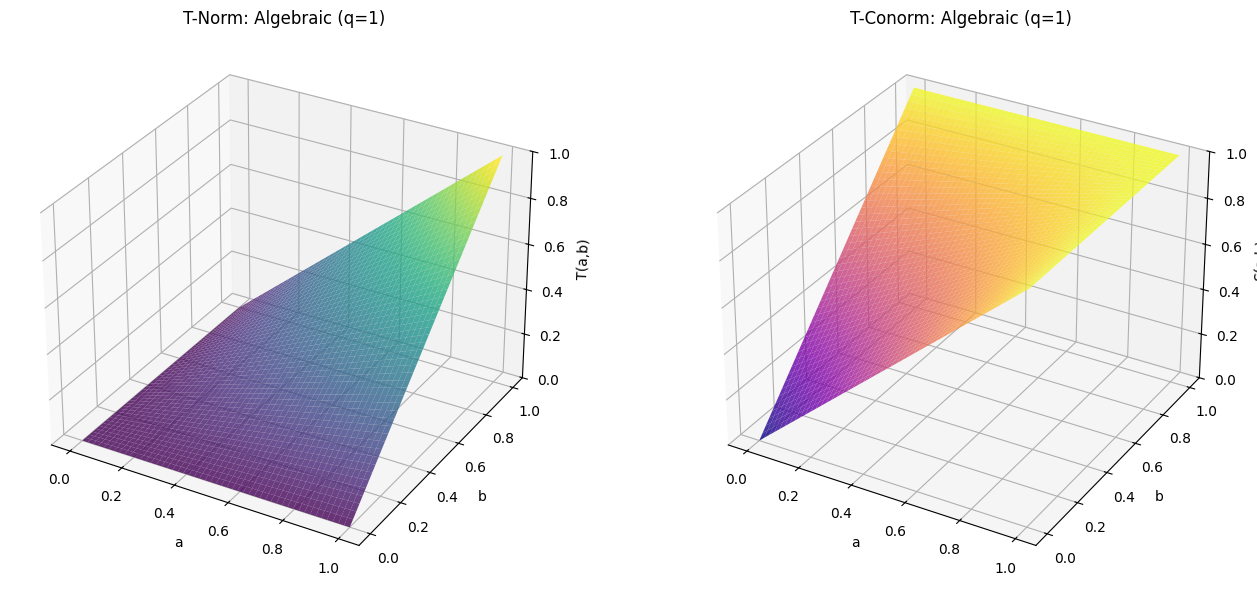
This tool is crucial for research and education, allowing for direct comparison and deeper understanding of the mathematical properties of each t-norm family.
The OperationTNorm Class
The main entry point to the t-norm framework is the OperationTNorm class.
It acts as a factory that provides a unified interface for all supported t-norm and t-conorm operations.
from axisfuzzy.core.triangular import OperationTNorm

# Create an instance for the algebraic t-norm
algebraic_op = OperationTNorm(norm_type='algebraic')

# Calculate the t-norm (fuzzy AND)
result_t = algebraic_op.t_norm(0.6, 0.7)  # Output: 0.42

# Calculate the t-conorm (fuzzy OR)
result_s = algebraic_op.t_conorm(0.6, 0.7)  # Output: 0.88
The OperationTNorm class also supports vectorized operations on NumPy arrays,
which is crucial for the high-performance computation in Fuzzarray.
Generator Functions for Archimedean T-Norms
A key feature of Archimedean t-norms is that they can be constructed from a generator function \(g: [0, 1] -> [0, \infty]\), which is a strictly decreasing and continuous function with \(g(1) = 0\). The t-norm is then given by:
\(T(a, b) = g_{inv}(g(a) + g(b))\)
where \(g_{inv}\) is the pseudo-inverse of \(g\).
The OperationTNorm instance provides access to these functions:
# Get the generator function and its inverse
g = algebraic_op.g_func
g_inv = algebraic_op.g_inv_func

# Verify the t-norm calculation
# g(0.6) + g(0.7) = -ln(0.6) + -ln(0.7) = 0.5108 + 0.3567 = 0.8675
# g_inv(0.8675) = exp(-0.8675) = 0.42
Support for q-Rung Fuzzy Sets
The framework also supports q-rung orthopair fuzzy sets (q-ROFNs) and q-rung orthopair hesitant fuzzy sets (q-ROHFNs).
This is achieved through an isomorphic mapping that transforms the q-rung membership and
non-membership degrees into a representation that is compatible with the standard t-norm
and t-conorm operations. This allows the same powerful fuzzy logic operators to be applied to
these more complex fuzzy set types. You can specify the q parameter during the initialization of OperationTNorm:
# Create an operator for a q-rung fuzzy set with q=3
qrofn_op = OperationTNorm(norm_type='einstein', q=3)
The Core Computational Engine
The computational power of Fuzznum and Fuzzarray is driven by a sophisticated, extensible framework
defined in the axisfuzzy.core.operation module. This engine is architected around two pivotal classes,
OperationMixin and OperationScheduler, which together provide a systematic and maintainable approach
to defining, registering, and dispatching fuzzy number operations.
This decoupled architecture separates the definition of an operation from its invocation, making the system highly modular and extensible.
OperationMixin: The Blueprint for Fuzzy Operations
The OperationMixin class is the cornerstone for defining all fuzzy arithmetic.
Think of it as a standardized “blueprint” or “template” that every operation must follow.
If you want to add a specific operational rule for a new fuzzy number type, you need to implement
a new OperationMixin subclass for that computation. For example, if you want to add addition
operations for the qrofn type, you need to implement an AddOperationQROFN class that inherits from OperationMixin.
This approach ensures that all operations, whether built-in or custom, behave consistently and
integrate seamlessly into the AxisFuzzy ecosystem.
Key responsibilities of an OperationMixin subclass include:
Operation Identification: Each subclass must define the operation’s name (e.g.,
'add','mul','gt') and the membership types (mtypes) it supports (e.g.,['qrofn']).Core Logic Implementation: Subclasses must override specific methods to provide the concrete implementation for binary (
_execute_binary_op_impl), unary (_execute_unary_op_operand_impl,_execute_unary_op_pure_impl), and comparison (_execute_comparison_op_impl) operations.Preprocessing and Validation: The mixin includes utility methods for preprocessing and validating operands, such as
_validate_operandsand_preprocess_operands. These methods ensure that operands are of the correct type,mtype, andq-rung, and handle any necessary conversions or coercions.Type-Safety Enforcement: The mixin includes type-checking mechanisms to ensure that operations are only performed on compatible fuzzy numbers (e.g., matching
mtypeandq-rung).
Note
The unary operations for _execute_unary_op_operand_impl and _execute_unary_op_pure_impl are different.
The former is for operations that require an operand and the latter is for operations that do not require an operand.
By adhering to this interface, the framework guarantees that all operations are consistent, predictable, and type-safe.
How It Works: The Blueprint Explained
At its core, OperationMixin is an abstract class that defines a contract.
Any class that inherits from it must provide implementations for a few key methods.
Here is a simplified view of its structure:
# Simplified from axisfuzzy/core/operation.py

from abc import ABC, abstractmethod

class OperationMixin(ABC):
    """A blueprint for all fuzzy operations."""

    @abstractmethod
    def get_operation_name(self) -> str:
        """Returns the unique name of the operation (e.g., 'add', 'multiply')."""
        pass

    @abstractmethod
    def get_supported_mtypes(self) -> list[str]:
        """Returns a list of fuzzy types this operation supports (e.g., ['qrofn'])."""
        pass

    def _execute_binary_op_impl(self, strategy_1, strategy_2, tnorm):
        """Implements the logic for Fuzznum (single number) operations."""
        raise NotImplementedError

    def _execute_fuzzarray_op_impl(self, fuzzarray_1, other, tnorm):
        """Implements the logic for Fuzzarray (vectorized) operations."""
        raise NotImplementedError

    # ... other methods for unary, comparison operations, etc. ...
The magic happens when you combine this blueprint with the @register_operation decorator.
This decorator automatically tells AxisFuzzy’s central “dispatcher” about your
new operation, making it available for use.
How to Implement a New Operation
Let’s see how this works in practice. Suppose we want to implement the addition operation
for q-Rung Orthopair Fuzzy Numbers (qrofn). The implementation would look something
like this:
# In axisfuzzy/fuzztype/qrofs/op.py
from axisfuzzy.core import OperationMixin, register_operation, OperationTNorm
from axisfuzzy import Fuzzarray

@register_operation
class QROFNAddition(OperationMixin):
    """Implements addition for q-Rung Orthopair Fuzzy Numbers."""

    def get_operation_name(self) -> str:
        # This name corresponds to the '+' operator.
        return 'add'

    def get_supported_mtypes(self) -> list[str]:
        # This operation is specifically for 'qrofn' types.
        return ['qrofn']

    def _execute_binary_op_impl(self, strategy_1, strategy_2, tnorm: OperationTNorm):
        """
        Defines the core logic for adding two Fuzznum objects.
        The 'strategy' objects contain the membership (md) and non-membership (nmd) degrees.
        """
        # The addition formula for QROFNs uses a T-conorm and a T-norm.
        md = tnorm.t_conorm(strategy_1.md, strategy_2.md)
        nmd = tnorm.t_norm(strategy_1.nmd, strategy_2.nmd)

        # The result is a dictionary of the new fuzzy number's components.
        return {'md': md, 'nmd': nmd, 'q': strategy_1.q}

    def _execute_fuzzarray_op_impl(self, fuzzarray_1, other, tnorm: OperationTNorm):
        """
        Defines the high-performance logic for adding Fuzzarray objects.
        This method works directly with the underlying NumPy arrays for speed.
        """
        mds1, nmds1 = fuzzarray_1.backend.get_component_arrays()
        mds2, nmds2 = other.backend.get_component_arrays() # Assumes 'other' is compatible

        md_res = tnorm.t_conorm(mds1, mds2)
        nmd_res = tnorm.t_norm(nmds1, nmds2)

        # Create a new Fuzzarray from the resulting arrays.
        backend_cls = fuzzarray_1.backend.__class__
        new_backend = backend_cls.from_arrays(md_res, nmd_res, q=fuzzarray_1.q)
        return Fuzzarray(backend=new_backend)
By following this pattern, you can extend AxisFuzzy with new operations for existing fuzzy types
or add complete support for entirely new types of fuzzy numbers. The framework ensures that once your
OperationMixin subclass is defined and registered, it will be automatically dispatched whenever
a user performs the corresponding operation (e.g., qrofn_1 + qrofn_2).
OperationScheduler: The Central Dispatcher
The OperationScheduler is the central “manager” of all fuzzy computations. It doesn’t perform
calculations itself. Instead, it directs traffic, dispatching tasks to the correct “worker”—a
specialized OperationMixin subclass.
Scheduler Principles
Operation Registration via Decorators
Through the
@register_operationdecorator, the manager (scheduler) know about its workers (mixin subclasses). This is the crucial link. When you define a new operation classop_nameand decorate it, you are essentially telling the scheduler at import time: “Here is a new worker. It handles the operation named byget_operation(self, op_name: str, mtype: str)for the fuzzy typesmtype.This automated registration process means you can add new functionality without ever touching the scheduler’s code. The system discovers and integrates new operations seamlessly.
Dynamic Operation Dispatch
When you write
fuzznum1 + fuzznum2, the__add__method of the fuzzy number internally calls the scheduler, asking it to find a suitable worker for the'add'operation and themtypeoffuzznum1. The scheduler looks up its registry, finds the correctOperationMixinsubclass, and delegates the task to it. This is the essence of the framework’s polymorphic behavior.T-Norm Management: Switching the Mathematical Engine
This is perhaps the most powerful and conceptually important feature of the scheduler. The T-norm and its dual, the T-conorm, are the fundamental building blocks for fuzzy set intersection and union. The choice of T-norm defines the mathematical properties of your fuzzy logic system.
The scheduler holds a globally configurable
OperationTNorminstance. When you callscheduler.set_t_norm('yager', yager_param=2), you are doing something profound:You are instructing the scheduler to create a new T-norm object, specifically an instance of the
YagerNormclass from thetriangularmodule.From that moment on, every operation dispatched by the scheduler (unless explicitly overridden) will be supplied with this new
YagerNormobject.The “worker” classes (e.g.,
QROFNAddition) use thet_norm()andt_conorm()methods of the provided object to perform their calculations. For example, addition is typically defined using the T-conorm for membership degrees and the T-norm for non-membership degrees.
Therefore, changing the T-norm is not just a parameter tweak; it is a fundamental switch of the underlying mathematical framework. It allows you to instantly pivot from, for example, the probabilistic logic of the
'algebraic'T-norm to the bounded-difference logic of the'lukasiewicz'T-norm, and observe the impact on your model’s behavior—all without changing any of the operation logic itself.# 1. Access the global scheduler instance from axisfuzzy.core.operation import get_registry_operation scheduler = get_registry_operation() # 2. Set a new T-norm scheduler.set_t_norm('yager', yager_param=2) # 3. Now, any operation performed after this will use the Yager T-norm result = fuzznum1 + fuzznum2 # This addition will use the Yager T-norm
Performance Monitoring
As a central dispatcher, the scheduler is perfectly positioned to monitor performance. It wraps every operation call with a timer, providing a simple yet effective way to benchmark different implementations or T-norms.
# 1. Access the global scheduler instance
from axisfuzzy.core.operation import get_registry_operation
scheduler = get_registry_operation()

# 2. Now, any operation performed after this will be timed
result = fuzznum1 + fuzznum2  # This addition will be timed

# 3. Check the performance metrics
print(scheduler.get_performance_metrics())
How to Expend
This manager/worker design makes the framework clean and easy to extend. Let’s look at its main jobs.
Registering and Finding Operations
The scheduler discovers its workers using the
@register_operationdecorator. When you create a new operation class and decorate it, you’re telling the scheduler: “I’ve built a new worker. Here’s what it does and what fuzzy types it supports.”# Conceptual: How a new operation is registered automatically from axisfuzzy.core import OperationMixin, register_operation @register_operation class NewSubtraction(OperationMixin): def get_operation_name(self): return 'sub' def get_supported_mtypes(self): return ['new_fuzzy_type'] # ... implementation ...
Once registered, you can ask the scheduler what operations are available for any fuzzy type.
# 1. Access the global scheduler instance
from axisfuzzy.core.operation import get_registry_operation
scheduler = get_registry_operation()

# 2. Check which operations are available for 'qrofn'
available_ops = scheduler.get_available_ops('qrofn')
print(f"QROFN supports: {available_ops}")
Switching the Mathematical Engine (T-Norms)
This is the scheduler’s most powerful feature. It lets you switch the entire mathematical foundation of your fuzzy logic with a single command. The T-norm defines how fuzzy intersection (AND) and union (OR) behave.
By default, the framework uses the
'algebraic'T-norm. But you can change it globally. When you do, the scheduler provides this new mathematical “engine” to all subsequent operations.# 3. Get the current global T-norm configuration print(f"Default T-Norm before: {scheduler.get_default_t_norm_config()}") # 4. Change the global T-norm to the Yager T-norm with parameter 2 # This instantly changes the math for all future default operations. scheduler.set_t_norm('yager', yager_param=2) print(f"Default T-Norm after: {scheduler.get_default_t_norm_config()}")
Performance Monitoring
As the central dispatcher, the scheduler can easily time every operation. This is useful for benchmarking and finding performance bottlenecks.
# 5. Get performance statistics
# (Note: Operations must be run first to generate stats)
# stats = scheduler.get_performance_stats()
# print(stats)

# To reset the timer cache:
# scheduler.clear_performance_stats()
Intelligent Dispatch: The operate Function
The operate function, located in axisfuzzy.core.dispatcher, is the internal engine that powers all
operator-based computations in AxisFuzzy. While you may never call it directly, it’s what makes
expressions like my_fuzzarray + 2 or fuzznum1 * fuzznum2 work seamlessly. Its sole purpose
is to act as an intelligent “traffic cop,” inspecting the types of the operands and routing the
calculation to the most efficient backend implementation.
This dispatch mechanism achieves two primary goals:
1. Unified User Experience: It allows you to use standard Python operators on all fuzzy types
and scalars, abstracting away the complex internal logic.
2. Maximized Performance: It aggressively prioritizes vectorized operations,
ensuring that calculations involving Fuzzarray are always as fast as possible.
Here is a breakdown of its core dispatch rules:
`Fuzznum` vs. `Fuzznum`: The simplest case. The operation is delegated directly to the underlying strategy object of the
Fuzznumfor a straightforward, element-wise calculation.`Fuzzarray` vs. `Fuzzarray`: This is the high-performance path. The operation is dispatched to the
Fuzzarray’sexecute_vectorized_opmethod, which leverages the optimized, compiled backend to perform the calculation across the entire array simultaneously.`Fuzzarray` vs. `Fuzznum` (Broadcasting): To maintain performance, the
Fuzznumis automatically “broadcast” into a newFuzzarraywith a shape compatible with the other array operand. The operation then proceeds as an efficient Fuzzarray vs. Fuzzarray calculation.Fuzzy Type vs. Scalar/`ndarray` (Broadcasting): When a fuzzy object interacts with a scalar (like an
intorfloat) or anumpy.ndarray, the non-fuzzy operand is broadcast to work with the fuzzy object’s backend. This ensures that even mixed-type operations benefit from vectorized computation where possible. For example, inmy_fuzzarray * 2, the scalar 2 is efficiently applied to every element in the array’s backend.Reverse Operations: The dispatcher correctly handles commutative operations where the fuzzy object is on the right-hand side (e.g.,
2 * my_fuzznum). It does this by simply swapping the operands and re-running the dispatch logic, avoiding redundant code.Unary Operations: Operations that take a single operand, like the
complement, are also handled, dispatching to the appropriate implementation on eitherFuzznumorFuzzarray.Operation Aliasing: For convenience and internal consistency, some operations are mapped to internal names. For instance, multiplication (
mul) or division (div) with a scalar is internally routed to thetim(times) operation, which is optimized for scalar multiplication.
By understanding this dispatch logic, you can better predict the performance characteristics of your fuzzy calculations and appreciate the design that makes AxisFuzzy both powerful and easy to use.
High-Performance Vectorization with OperationMixin
While the FuzzarrayBackend provides the optimized Struct-of-Arrays (SoA) data layout,
the true engine for high-performance computation on Fuzzarray objects is the synergy between
OperationMixin and the backend. Instead of iterating over individual fuzzy numbers, AxisFuzzy
leverages specialized, vectorized methods to execute operations on entire arrays at once.
The Gateway to Vectorization: execute_fuzzarray_op
The key to this process is the OperationMixin.execute_fuzzarray_op method. It serves as the
designated entry point for operations involving at least one Fuzzarray. When the dispatcher
encounters an operation like fuzzarray1 + fuzzarray2, it bypasses the scalar execution path
and directly calls the execute_fuzzarray_op method on the appropriate OperationMixin subclass.
This method, in turn, calls the abstract _execute_fuzzarray_op_impl, which concrete operation
classes must override to provide a high-performance implementation.
Implementing Vectorized Logic
Inside an _execute_fuzzarray_op_impl override, the developer has direct access to the operands’
underlying data structures. The logic typically follows these steps:
Access the Backend: Retrieve the
FuzzarrayBackendinstance from theFuzzarrayoperand(s).Extract Component Arrays: Get the raw NumPy arrays for each fuzzy component (e.g.,
md,nmd) from the backend.Perform Vectorized Computation: Apply the operation’s logic directly to these NumPy arrays using the provided
OperationTNorminstance. This is where the significant performance gain occurs, as NumPy executes these operations in optimized, compiled C or Fortran code.Construct a New Backend: Create a new
FuzzarrayBackendinstance from the resulting component arrays.Return a New Fuzzarray: Wrap the new backend in a new
Fuzzarrayobject to be returned to the user.
High-Performance Vectorized Computations
The core of axisfuzzy’s performance lies in its ability to execute operations on entire
Fuzzarray objects at once, leveraging the power of NumPy for vectorized calculations.
When implementing custom operations by subclassing OperationMixin, it is crucial to provide an
efficient, vectorized implementation in the _execute_fuzzarray_op_impl method.
Vectorized Binary Operations
This method is the engine for binary operators like +, *, etc., on Fuzzarray objects.
A correct implementation avoids Python loops and operates directly on the underlying NumPy arrays stored in the backend.
The key steps are:
Prepare Operands: Extract the component NumPy arrays (e.g., membership, non-membership) from the
Fuzzarrayoperands. This step must also handle broadcasting rules between aFuzzarrayand anotherFuzzarrayor a scalarFuzznum.Execute Vectorized Calculation: Use the provided
OperationTNorminstance to perform the core fuzzy logic (e.g.,tnorm.t_conorm(md1, md2)). SinceOperationTNormmethods are designed to work on NumPy arrays, this step is highly efficient.Construct Result: Create a new backend instance from the resulting component arrays and wrap it in a new
Fuzzarray.
Here is a practical example showing the implementation of vectorized addition for qrofn types.
Note how the logic for preparing operands and broadcasting is handled explicitly, as would be done
inside a helper function like _prepare_operands.
# Example: Core algorithm for vectorized binary addition in QROFNAddition
def _execute_fuzzarray_op_impl(self, fuzzarray_1, other, tnorm):
    # Step 1: Extract component arrays from operands
    mds1, nmds1 = fuzzarray_1.backend.get_component_arrays()
    mds2, nmds2 = self._prepare_operands(other)  # Handle Fuzzarray/Fuzznum cases

    # Step 2: Execute vectorized T-norm/T-conorm operations
    md_result = tnorm.t_conorm(mds1, mds2)
    nmd_result = tnorm.t_norm(nmds1, nmds2)

    # Step 3: Construct and return new Fuzzarray
    backend_cls = get_registry_fuzztype().get_backend(fuzzarray_1.mtype)
    new_backend = backend_cls.from_arrays(md_result, nmd_result, q=fuzzarray_1.q)
    return Fuzzarray(backend=new_backend)
Optimized Reductions: t_norm_reduce and t_conorm_reduce
For aggregation operations that rely on T-norms (e.g., calculating a fuzzy-valued sum or product across an axis),
a critical performance feature must be used: the t_norm_reduce() and t_conorm_reduce() methods of
the OperationTNorm object.
Why are they important? A naive implementation might loop over the array, applying the T-norm pairwise. This is extremely inefficient.
How do they work? These
reducemethods employ highly optimized algorithms, such as tree-based reduction, which dramatically reduce the number of Python function calls and structure the computation for better performance. Using them is not just a suggestion; it is essential for achieving high performance in custom reduction operations.
This architecture ensures that operations on large Fuzzarray objects are not just convenient but also
exceptionally fast, fully leveraging the power of NumPy’s vectorized engine within the fuzzy logic framework.
Supported Operations: Complete Reference
AxisFuzzy provides comprehensive support for mathematical and logical operations on both
Fuzznum and Fuzzarray objects through intuitive Python operator overloading. This section
provides a complete reference of all supported operations, organized by category.
Arithmetic Operations
The framework supports all standard arithmetic operations with seamless integration:
Basic Arithmetic
from axisfuzzy import Fuzznum, Fuzzarray
import numpy as np

# Create fuzzy numbers
a = Fuzznum(mtype='qrofn').create(md=0.8, nmd=0.3, q=2)
b = Fuzznum(mtype='qrofn').create(md=0.6, nmd=0.4, q=2)

# Arithmetic operations
result_add = a + b          # Addition using t-conorm
result_sub = a - b          # Subtraction
result_mul = a * b          # Multiplication using t-norm
result_div = a / b          # Division
result_pow = a ** 2         # Power operation

# Reverse operations are also supported
result_radd = 0.5 + a       # Reverse addition with scalar
result_rmul = 2.0 * a       # Reverse multiplication with scalar
Vectorized Arithmetic with Fuzzarray
# Create fuzzy arrays
arr1 = Fuzzarray(mtype='qrofn', q=2)
arr1.backend.from_arrays(
    md=np.array([0.8, 0.7, 0.9]),
    nmd=np.array([0.2, 0.3, 0.1])
)

arr2 = Fuzzarray(mtype='qrofn', q=2)
arr2.backend.from_arrays(
    md=np.array([0.6, 0.5, 0.8]),
    nmd=np.array([0.3, 0.4, 0.2])
)

# Vectorized operations
vec_add = arr1 + arr2       # Element-wise addition
vec_mul = arr1 * arr2       # Element-wise multiplication
vec_pow = arr1 ** 2         # Element-wise power
Comparison Operations
All standard comparison operators are supported, returning boolean arrays for Fuzzarray objects:
# Comparison operations
gt_result = a > b           # Greater than
lt_result = a < b           # Less than
ge_result = a >= b          # Greater than or equal
le_result = a <= b          # Less than or equal
eq_result = a == b          # Equality
ne_result = a != b          # Inequality

# For Fuzzarray, returns boolean NumPy arrays
arr_gt = arr1 > arr2        # Returns: np.ndarray of bool
arr_eq = arr1 == arr2       # Element-wise equality comparison
Logical Operations
Fuzzy set operations are implemented through operator overloading, providing intuitive syntax:
Set Operations
# Fuzzy set operations
intersection = a & b        # Intersection (fuzzy AND)
union = a | b              # Union (fuzzy OR)
complement = ~a            # Complement (fuzzy NOT)
symdiff = a ^ b           # Symmetric difference (fuzzy XOR)
Implication Operations
# Fuzzy implication operations
right_impl = a >> b        # Right implication: a → b
left_impl = a << b         # Left implication: a ← b (equivalent to b → a)
Equivalence Operation
# Fuzzy equivalence (biconditional)
equiv = a.equivalent(b)    # Equivalence: a ↔ b
Matrix Operations
For Fuzzarray objects, matrix multiplication is supported:
# Matrix multiplication for compatible Fuzzarray shapes
matrix_a = Fuzzarray(mtype='qrofn', q=2, shape=(3, 4))
matrix_b = Fuzzarray(mtype='qrofn', q=2, shape=(4, 2))

# Matrix multiplication using @ operator
result_matmul = matrix_a @ matrix_b  # Shape: (3, 2)
Operation Categories Summary
The following table summarizes all supported operations:
Category |
Operator |
Method |
Description |
|---|---|---|---|
Arithmetic |
|
|
Addition using t-conorm |
|
|
Subtraction |
|
|
|
Multiplication using t-norm |
|
|
|
Division |
|
|
|
Power operation |
|
Comparison |
|
|
Greater than |
|
|
Less than |
|
|
|
Greater than or equal |
|
|
|
Less than or equal |
|
|
|
Equality |
|
|
|
Inequality |
|
Logical |
|
|
Intersection (fuzzy AND) |
|
|
Union (fuzzy OR) |
|
|
|
Complement (fuzzy NOT) |
|
|
|
Symmetric difference (fuzzy XOR) |
|
Implication |
|
|
Right implication (a → b) |
|
|
Left implication (a ← b) |
|
N/A |
|
Equivalence (a ↔ b) |
|
Matrix |
|
|
Matrix multiplication |
Type Compatibility and Broadcasting
All operations support intelligent type compatibility and broadcasting:
Fuzzy-Fuzzy Operations: Between compatible fuzzy types with matching
mtypeandqparametersFuzzy-Scalar Operations: Between fuzzy objects and Python scalars or NumPy scalars
Fuzzy-Array Operations: Between
Fuzzarrayand NumPy arrays with compatible shapesBroadcasting: Automatic shape broadcasting following NumPy conventions for
Fuzzarrayoperations
Note
All operations respect the configured T-norm and T-conorm settings. You can control the fuzzy logic behavior by setting the global T-norm using the operation scheduler:
from axisfuzzy.core.registry import get_registry_operation

scheduler = get_registry_operation()
scheduler.set_t_norm('einstein')  # Set global T-norm to Einstein
Practical Operations
This guide provides a comprehensive walkthrough of the operational capabilities within AxisFuzzy.
We will explore how to perform arithmetic, logical, and other operations on Fuzznum and
Fuzzarray objects, and delve into the underlying mechanisms that make these operations both
intuitive and highly performant.
The Operation Engine: dispatcher.py and OperationMixin
At the core of all fuzzy computations is a sophisticated dispatch system. When you write a + b,
where a and b are fuzzy objects, you are not just invoking a simple method. Instead,
you are triggering a chain of events orchestrated by the central operate function
in axisfuzzy.core.dispatcher.
This dispatcher is the “brain” that:
Inspects the types of the operands (
Fuzznum,Fuzzarray, scalar, etc.).Determines the most efficient execution path based on a set of dispatch rules.
Delegates the actual computation to a specialized
OperationMixinsubclass registered for that specific operation (e.g., ‘add’, ‘mul’) and fuzzy type (mtype).
This architecture ensures that the same high-level syntax (+, *, >) is consistently applied,
while the framework intelligently selects the best implementation, whether it’s a simple scalar operation
or a complex, vectorized computation on a large array.
Operations on Fuzznum Objects
A Fuzznum represents a single, atomic fuzzy number. Operations between Fuzznum objects are the most fundamental use case.
Creating Fuzznum Objects
As detailed in the Core Data Structures: Fuzznum and Fuzzarray guide, the recommended way to
create Fuzznum objects is via the axisfuzzy.core.fuzznum() factory.
Performing Basic Arithmetic
Let’s see an example of adding two q-Rung Orthopair Fuzzy Numbers (q-ROFNs).
from axisfuzzy.core import fuzznum
from axisfuzzy.core.operation import get_registry_operation

# Get the global operation scheduler and set the T-Norm. 'algebraic' is the default.
# The T-Conorm (for addition) is derived from the T-Norm.
scheduler = get_registry_operation()
scheduler.set_t_norm('algebraic')

# Create two q-ROFNs using the fuzzynum factory
a = fuzznum(md=0.8, nmd=0.1, q=3)
b = fuzznum(md=0.7, nmd=0.2, q=3)

# Perform addition
c = a + b

print(f"a: {a}")
print(f"b: {b}")
print(f"a + b: {c}")

# For algebraic T-Conorm: S(x, y) = x + y - xy
# c.md = 0.8 + 0.7 - 0.8 * 0.7 = 0.94
# For algebraic T-Norm: T(x, y) = x * y
# c.nmd = 0.1 * 0.2 = 0.02
# The result is a new Fuzznum with md=0.94 and nmd=0.02
Behind the Scenes: The Dispatch Flow
a + bcalls the special methoda.__add__(b).Fuzznum.__add__delegates the call tooperate('add', a, b).The
operatefunction indispatcher.pyinspects the types and finds the rule for(Fuzznum, Fuzznum).It then calls
a.get_strategy_instance().execute_operation('add', b.get_strategy_instance()).The strategy instance looks up the registered operation for
mtype='qrofn'andop_name='add'. This resolves to theQROFNAdditionclass defined inaxisfuzzy.fuzztype.qrofs.op.The
QROFNAddition.execute_binary_opmethod is called. It fetches the global T-Norm configuration fromOperationTNorm.It computes the new
mdusing the T-Conorm and the newnmdusing the T-Norm.It returns a result dictionary (e.g.,
{'md': 0.94, 'nmd': 0.02, 'q': 3}).This dictionary is used to construct a new
Fuzznumobject, which is the final result.
High-Performance Vectorized Operations with Fuzzarray
Fuzzarray is the key to performance. It uses a Struct of Arrays (SoA) backend to enable
lightning-fast vectorized computations, powered by NumPy.
Creating Fuzzarray Objects
The axisfuzzy.core.fuzzyarray() factory is the recommended entry point for creating Fuzzarray instances.
import numpy as np
from axisfuzzy.core import fuzzyarray, fuzzynum

# Path 1: From a list of Fuzznum objects (user-friendly)
fuzznums_list = [
    fuzzynum(md=0.8, nmd=0.1, q=3),
    fuzzynum(md=0.7, nmd=0.2, q=3),
    fuzzynum(md=0.9, nmd=0.0, q=3)
]
arr1 = fuzzyarray(fuzznums_list)
print(f"Array from Fuzznums:\n{arr1}")

# Path 2: From raw NumPy arrays (high-performance)
mds = np.array([0.8, 0.7, 0.9])
nmds = np.array([0.1, 0.2, 0.0])
# The shape must be (number_of_components, number_of_elements)
raw_data = np.array([mds, nmds])

arr2 = fuzzyarray(data=raw_data, mtype='qrofn', q=3)
print(f"Array from raw data:\n{arr2}")
Vectorized Arithmetic
Operations involving at least one Fuzzarray are automatically vectorized for maximum efficiency.
# arr1 and arr2 are from the previous example

# 1. Fuzzarray and a scalar
# The dispatcher handles this by broadcasting the scalar.
arr_plus_scalar = arr1 + 0.05
print(f"Fuzzarray + scalar:\n{arr_plus_scalar}")

# 2. Fuzzarray and Fuzzarray (element-wise)
arr_sum = arr1 + arr2
print(f"Element-wise Fuzzarray addition:\n{arr_sum}")

# 3. Fuzzarray and Fuzznum (broadcasting)
# The Fuzznum is automatically broadcast to the shape of the Fuzzarray.
single_fuzznum = fuzzynum(md=0.5, nmd=0.3, q=3)
arr_mul_fuzznum = arr1 * single_fuzznum
print(f"Fuzzarray * Fuzznum (broadcasting):\n{arr_mul_fuzznum}")
Behind the Scenes: Vectorized Dispatch
arr1 + arr2callsarr1.__add__(arr2).Fuzzarray.__add__callsoperate('add', arr1, arr2).dispatcher.operatesees the(Fuzzarray, Fuzzarray)pair and callsarr1.execute_vectorized_op('add', arr2).execute_vectorized_opretrieves the correctOperationMixinfor ‘add’ and ‘qrofn’.It calls the
execute_fuzzarray_opmethod on this mixin, which in turn calls the high-performance_execute_fuzzarray_op_impl.Inside
_execute_fuzzarray_op_impl, the operation is performed directly on the entire NumPy arrays from the SoA backends (e.g.,backend.mds,backend.nmds). This is where the vectorization provides a massive speedup.A new
FuzzarrayBackendis created from the resulting NumPy arrays.A new
Fuzzarrayis created from this backend (the “fast path”), and the result is returned.
Controlling Fuzzy Logic with T-Norms
The mathematical behavior of operations like * (T-Norm) and + (T-Conorm) is not fixed.
You can change it globally for all subsequent operations using the OperationTNorm class.
from axisfuzzy.core import fuzznum
from axisfuzzy.core.operation import get_registry_operation

a = fuzzynum(md=0.8, nmd=0.1, q=3)
b = fuzzynum(md=0.7, nmd=0.2, q=3)

# Get the global operation scheduler
scheduler = get_registry_operation()

# Default is 'algebraic'
scheduler.set_t_norm('algebraic')
print(f"Algebraic Multiplication (a*b): {a * b}")

# Change the global T-Norm to 'einstein'
scheduler.set_t_norm('einstein')
print(f"Einstein Multiplication (a*b): {a * b}")

# Change it to 'lukasiewicz'
scheduler.set_t_norm('lukasiewicz')
print(f"Lukasiewicz Multiplication (a*b): {a * b}")
Comparison
Comparisons are also dispatched via operate and return crisp boolean values based on the
score and accuracy functions of the fuzzy numbers.
from axisfuzzy.core import fuzzynum, fuzzyarray
import numpy as np

# Fuzznum comparison
a = fuzzynum(md=0.8, nmd=0.1, q=3)  # score = 0.8**3 - 0.1**3 = 0.511
b = fuzzynum(md=0.7, nmd=0.2, q=3)  # score = 0.7**3 - 0.2**3 = 0.335
print(f"a > b: {a > b}")  # True

# Fuzzarray vectorized comparison
arr = fuzzyarray([a, b])
other_fn = fuzzynum(md=0.75, nmd=0.15, q=3) # score = 0.75**3 - 0.15**3 = 0.418...
result = arr > other_fn
print(f"Array > Fuzznum: {result}") # [ True False]
Developer Guide: Implementing Custom Operations
AxisFuzzy’s greatest strength is its extensibility. The operations framework is designed as a plug-and-play system, allowing developers to seamlessly add new arithmetic, logical, or comparison operations for both existing and custom fuzzy number types. This guide provides a comprehensive walkthrough for creating and registering your own operations.
The Core Components
Two components are central to the operation system:
OperationMixin: An abstract base class defined inaxisfuzzy.core.operation. Every operation class must inherit from it. It defines the standard interface that the dispatcher expects, including methods for identifying the operation, specifying supported types, and executing the logic.@register_operation: A decorator that acts as the bridge between your custom operation class and the globalOperationScheduler. When you decorate your class with it, the scheduler automatically indexes it, making it available for dispatch whenever a matching operation is requested.
Step-by-Step Implementation Guide
Let’s create a custom operation from scratch. We’ll implement a “Dombi Intersection” operator,
which is a specific type of t-norm based operation, for our qrofn fuzzy numbers.
Step 1: Create the Operation File
It’s best practice to group operations for a specific fuzzy type in a dedicated module. For QROFNs, we will add our new class to this file.
Step 2: Define the Operation Class
Create a new class that inherits from OperationMixin and decorate it with @register_operation.
from axisfuzzy.core import OperationMixin, register_operation, OperationTNorm
from axisfuzzy import Fuzznum, Fuzzarray

@register_operation
class QROFNDombiIntersection(OperationMixin):
    """
    Implements the Dombi intersection operation for QROFNs.
    This is a custom logical operation, not tied to standard operators.
    """
    # ... implementation details will go here ...
Step 3: Implement Metadata Methods
The dispatcher needs to know what your operation is called and what fuzzy types it supports.
get_operation_name(): This must return a unique string that identifies your operation. This name is used when calling the operation explicitly via theoperatefunction.get_supported_mtypes(): This must return a list of strings, where each string is a fuzzy type (mtype) that this class can handle.
def get_operation_name(self) -> str:
    return 'dombi_intersect'

def get_supported_mtypes(self) -> list[str]:
    return ['qrofn']
Step 4: Implement the Fuzznum Logic
The _execute_binary_op_impl method contains the core logic for an operation between two Fuzznum instances.
It receives the internal “strategy” objects of the two numbers and the active
tnormconfiguration.It should return a dictionary containing the components of the resulting fuzzy number.
def _execute_binary_op_impl(self, strategy_1, strategy_2, tnorm: OperationTNorm):
    """
    Calculates the intersection of two QROFNs using the configured t-norm.
    This example demonstrates proper usage of the tnorm parameter.
    """
    # Use the configured t-norm for membership degree (intersection)
    md = tnorm.t_norm(strategy_1.md, strategy_2.md)

    # Use the configured t-conorm for non-membership degree (union)
    nmd = tnorm.t_conorm(strategy_1.nmd, strategy_2.nmd)

    return {'md': md, 'nmd': nmd, 'q': strategy_1.q}
Step 5: Implement the ``Fuzzarray`` Logic (for Performance)
To support high-speed, vectorized operations on Fuzzarray objects, you must implement
_execute_fuzzarray_op_impl. This method applies the same formula but to entire NumPy arrays at once.
def _execute_fuzzarray_op_impl(self, fuzzarray_1: Fuzzarray, other: Fuzzarray, tnorm: OperationTNorm):
    mds1, nmds1, mds2, nmds2 = _prepare_operands(fuzzarray_1, other)

    # Use the configured t-norm for vectorized membership degree calculation
    md_res = tnorm.t_norm(mds1, mds2)

    # Use the configured t-conorm for vectorized non-membership degree calculation
    nmd_res = tnorm.t_conorm(nmds1, nmds2)

    # Construct the resulting Fuzzarray
    backend_cls = get_registry_fuzztype().get_backend('qrofn')
    new_backend = backend_cls.from_arrays(md_res, nmd_res, q=fuzzarray_1.q)
    return Fuzzarray(backend=new_backend)
Step 6: Use Your New Operation
Since this operation doesn’t correspond to a standard Python operator like + or *,
you invoke it using the central operate function.
from axisfuzzy import qrofn, operate

a = qrofn(0.8, 0.1, q=3)
b = qrofn(0.7, 0.2, q=3)

# Call the custom operation by its registered name
result = operate('dombi_intersect', a, b)

print(f"Dombi Intersection of a and b: {result}")
This completes the process. Your custom operation is now a first-class citizen in the AxisFuzzy ecosystem, complete with support for both single objects and high-performance arrays.
Conclusion
The AxisFuzzy operations framework is a powerful, layered system designed for flexibility, extensibility, and performance. By building upon a solid mathematical foundation of t-norms, it provides a consistent and predictable environment for fuzzy arithmetic.
Key takeaways from this guide include:
Layered Architecture: The system is composed of distinct layers, from the mathematical
OperationTNormto theOperationMixinfor defining logic, theoperatedispatcher for central coordination, and theFuzzarrayBackendfor high-performance computation. This separation of concerns makes the framework robust and easy to maintain.Extensibility by Design: The core design philosophy is to empower developers. By subclassing
OperationMixinand using the@register_operationdecorator, you can introduce custom fuzzy number types and operations. The central dispatcher automatically discovers and integrates them, making them first-class citizens of the ecosystem.Performance-Oriented Design: Through the Struct-of-Arrays (SoA) architecture and the
FuzzarrayBackend, AxisFuzzy achieves high-performance vectorized computations on large datasets, seamlessly bridging the gap between intuitive object-oriented code and optimized numerical backends like NumPy.Unified Interface: Whether you are working with a single
Fuzznumor a largeFuzzarray, the operational syntax remains consistent. Standard Python operators (+,*,>, etc.) are overloaded to work intuitively, abstracting away the complex dispatching and computation logic.
This architecture not only provides a rich set of built-in fuzzy operations but also empowers users to tailor the library to their specific research and application needs. By understanding these core components, you are now equipped to leverage the full power of AxisFuzzy’s operational capabilities.